

URL
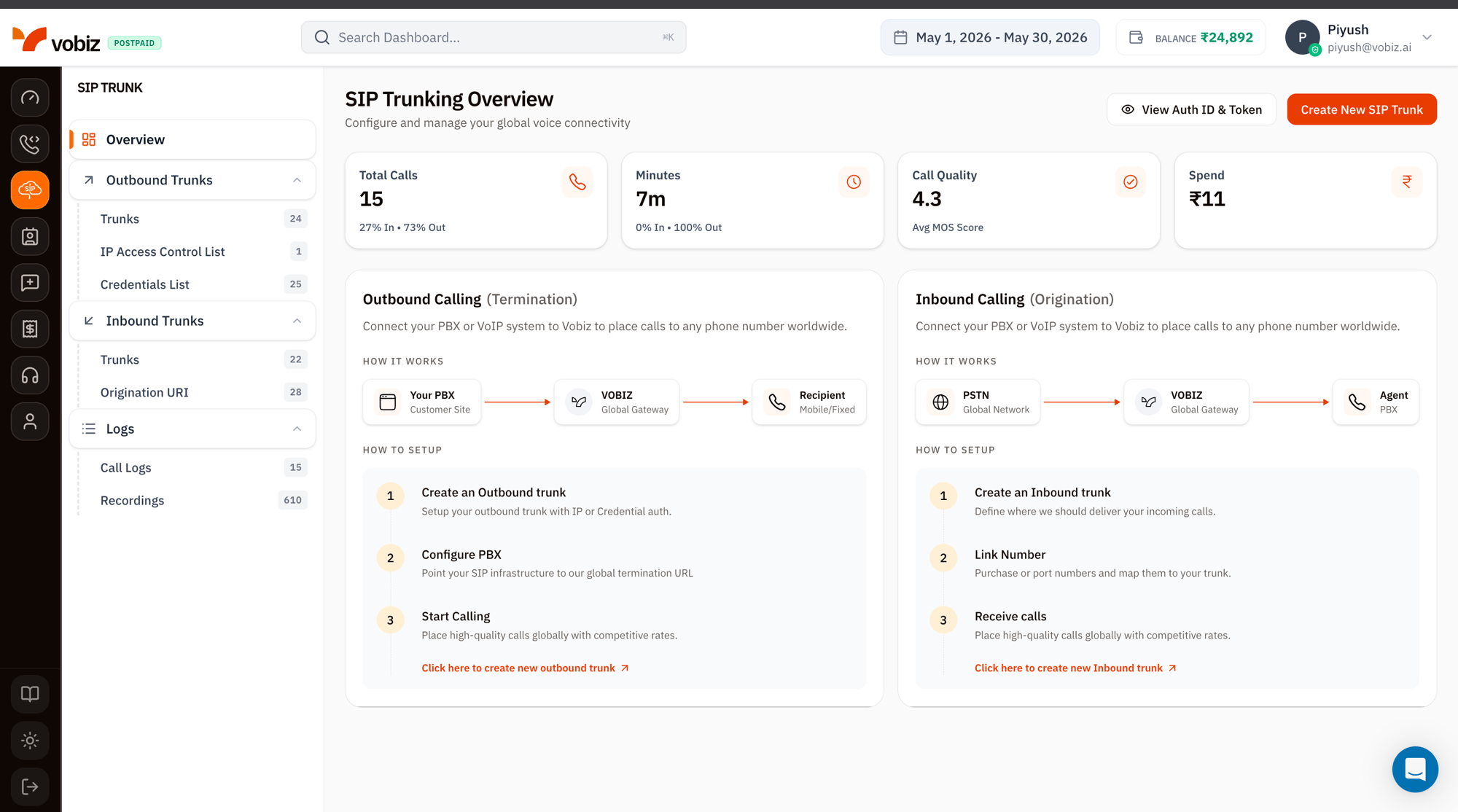
SIP Trunking Overview - usage tiles plus outbound and inbound how-it-works
The SIP Trunking sidebar
The left navigation mirrors the SIP Trunk console exactly. Each item links to its dedicated walkthrough:Usage tiles
Four KPI tiles summarising SIP‑only traffic for the selected date range:Outbound Calling (Termination)
The right‑side “How it works” panel walks the path Your PBX → Vobiz Global Gateway → Recipient (mobile / fixed line).
Click Create New SIP Trunk in the top‑right of the overview, or Click here to create new outbound trunk at the bottom of the Outbound panel.
Inbound Calling (Origination)
The left‑side panel walks the path PSTN Global Network → Vobiz Global Gateway → your Agent / PBX / soft‑switch.View Auth ID & Token
The View Auth ID & Token button (top‑right) reveals your API credentials in a modal - same values as the main Dashboard, surfaced here for convenience when scripting SIP trunk provisioning via the Trunks API.What’s next
Create an Outbound Trunk
Connect your PBX to place calls worldwide.
Create an Inbound Trunk
Receive PSTN calls to your numbers.