

URL
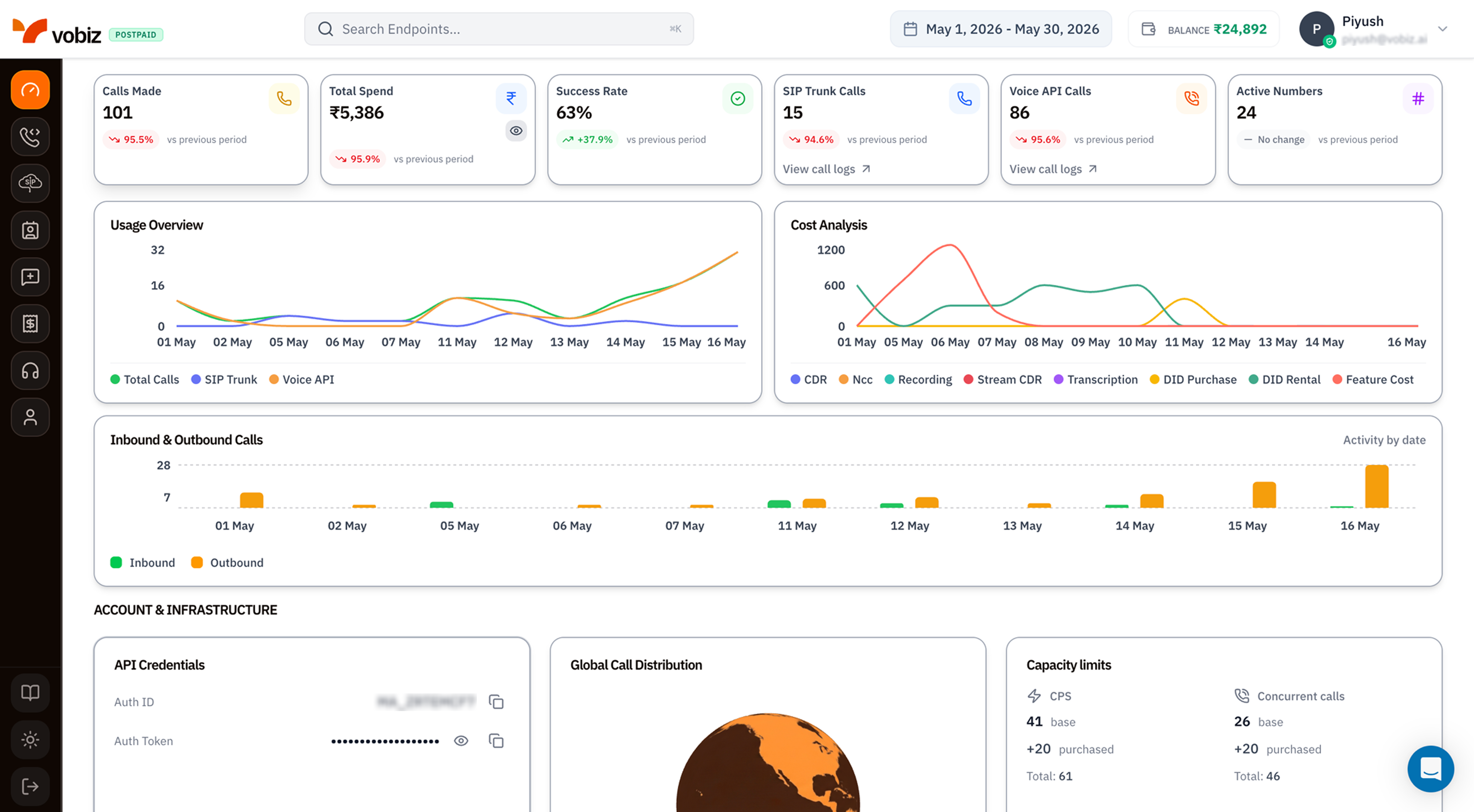
Vobiz Console - Dashboard
1. Top bar
The fixed bar at the very top of every console page.2. KPI tiles
Six tiles summarising the date range you picked. Every tile shows the current period value plus a trend pill comparing it to the previous period of the same length.
The trend pill colours:
- Green ↑ - value increased vs the previous period.
- Red ↓ - value decreased.
- Grey “No change” - same as previous period.
The pill compares like‑for‑like windows. A 30‑day current period is compared to the 30 days immediately before it.
3. Usage & cost charts
Two side‑by‑side line charts that animate when you change the date range.Usage Overview
Plots three series per day:- Total Calls (green) - every connected call.
- SIP Trunk (purple) - the subset routed through trunks.
- Voice API (orange) - the subset via REST / XML.
Cost Analysis
Breaks your spend down by line item per day:4. Inbound & Outbound Calls
A daily bar chart with two stacked series:- Inbound (green) - calls received on your numbers.
- Outbound (orange) - calls placed from your account.
Activity by date label at the top‑right is the only legend; click either colour swatch at the bottom to filter the chart to that direction alone.
5. Account & Infrastructure
The bottom section groups everything you need to integrate with the API into three cards.API Credentials
Global Call Distribution
The world map shows where calls originated and terminated in the selected date range. Darker regions = more traffic. Hover any country to see the per‑country call count and spend. Useful for spotting:- Unexpected geographies - a sudden cluster in a country you don’t serve usually means a misconfigured campaign or fraud. Cross‑check in CDRs and block the country in your dialler if needed.
- Regulatory hot spots - heavy India traffic? Make sure you’re current on DLT registration and KYC.
Capacity limits
Two side‑by‑side counters showing how much call capacity your account is provisioned for.
Need more capacity? Use the CPS & Cost Calculator to size what you need, then ping support@vobiz.ai to provision.
Left sidebar
The vertical icon strip on the far left is the primary navigation. From top to bottom:Tips
- Bookmark
console.vobiz.ai/app/dashboard. It’s the fastest way back if you get lost in nested settings. - Pin the date range to “Last 7 days” in your head - almost every triage starts there before you zoom out.
- Watch the BALANCE pill. Postpaid accounts can run negative briefly, but prepaid accounts will hard‑stop calls at ₹0. Set up auto‑recharge in Billing to avoid surprises.
What’s next
Quick Start
Make your first call in under 5 minutes using these credentials.
Vobiz API Reference
Drop the Auth ID and Auth Token straight into the live API explorer.