

URL
The model
A campaign is built from three resources that live side‑by‑side in the Voice Applications sidebar:Campaign Agents
Reusable answer/hangup webhook configs. Created once, used by many campaigns.
Campaigns
The actual outbound runs - agent + numbers + contacts + pacing.
Campaign Call Logs
Per‑attempt history for every campaign.
Create a new campaign
Click + New Campaign to open the side panel. The form is long; this page walks every field in order.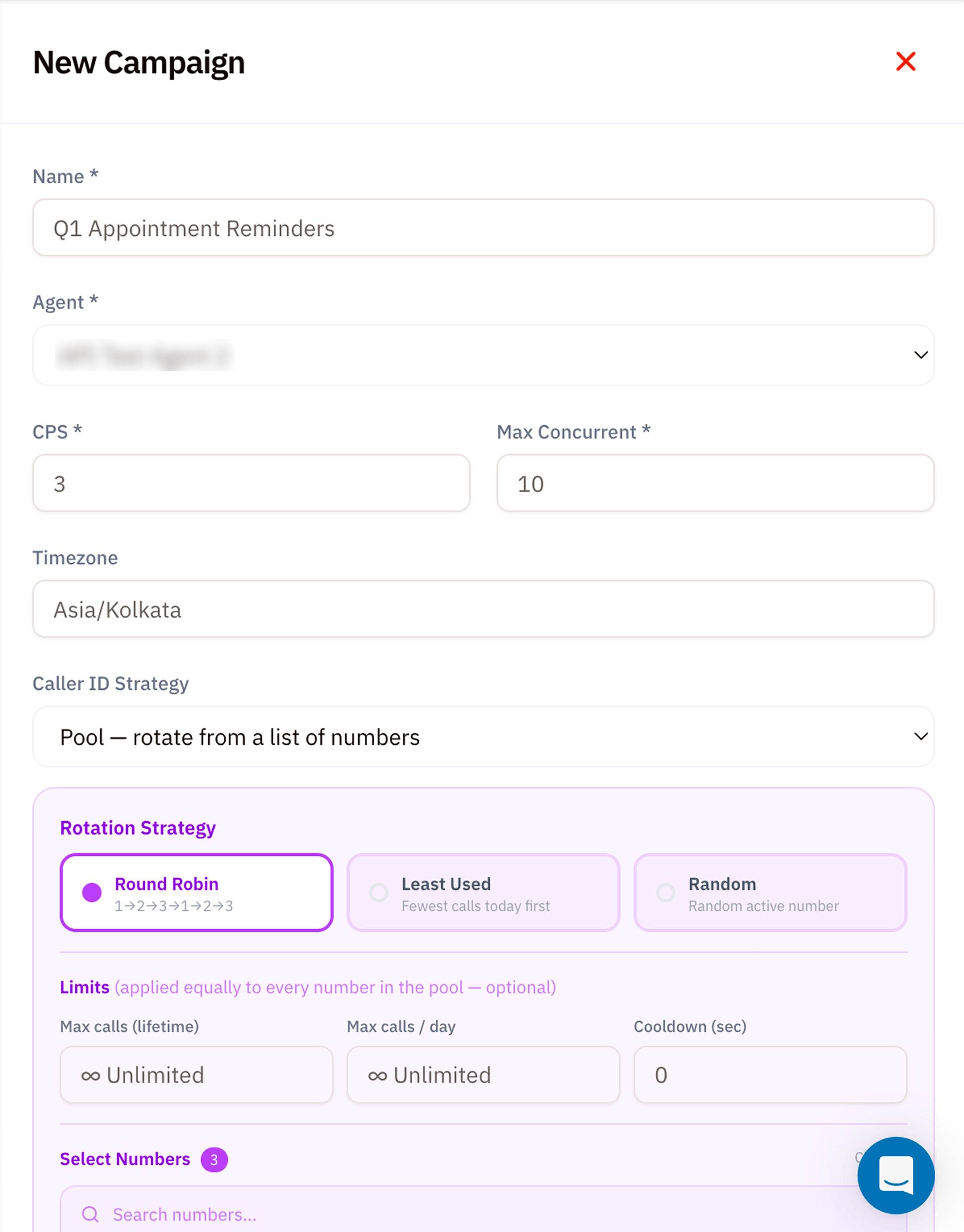
New Campaign - basic info, agent, pacing, and caller ID strategy
1. Basic info
2. Pacing
3. Caller ID Strategy
Decide which of your phone numbers should appear as the caller ID on each attempt.4. Rotation Strategy (only shown for Pool)
5. Limits (optional, applied to every number in the pool)
6. Select numbers + Contacts CSV
Scroll down for the second half of the form.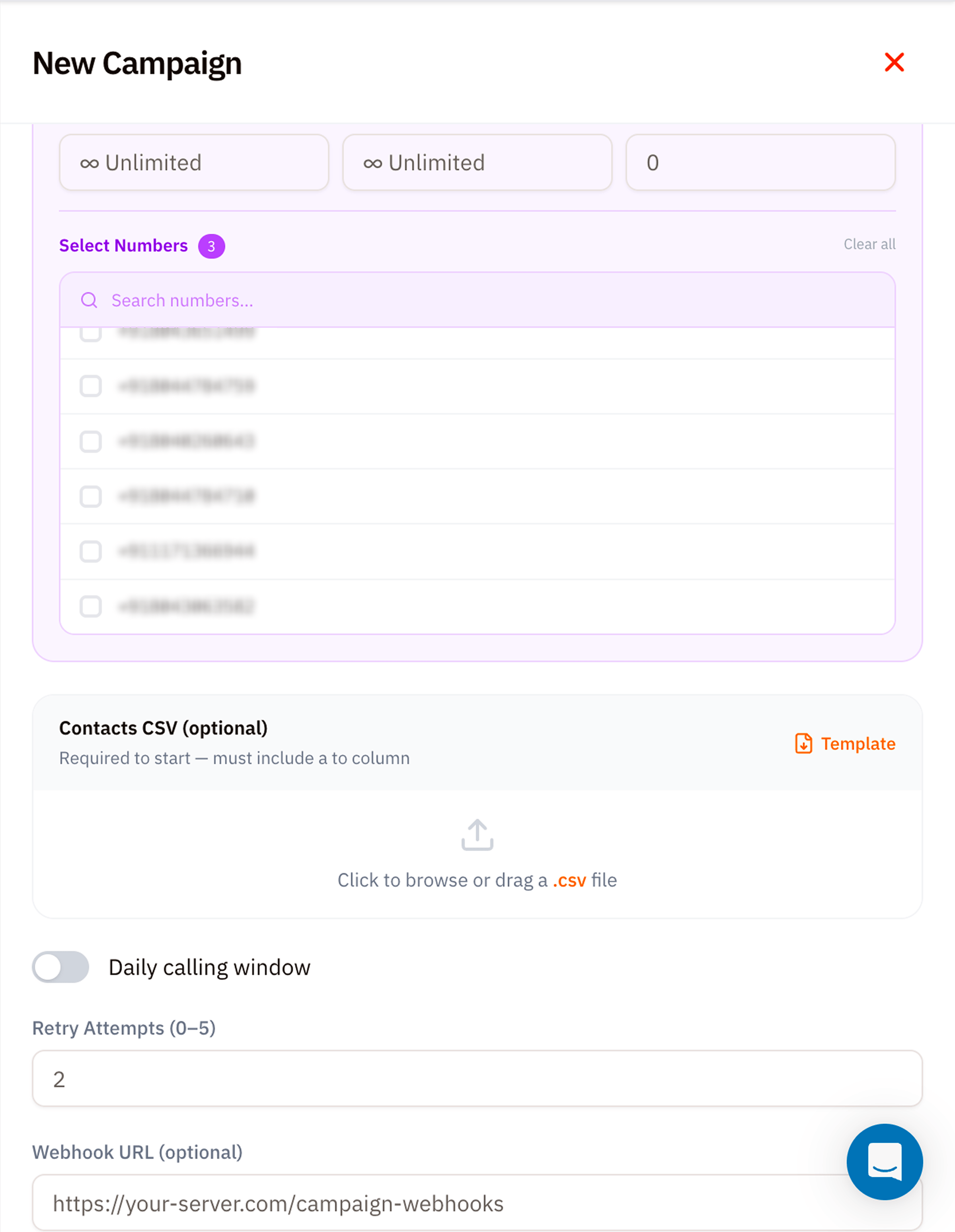
New Campaign - pick numbers, upload CSV, set retry policy and webhooks
Select Numbers
Tick the caller‑ID numbers Vobiz should rotate through. The badge next to Select Numbers counts your current selection. Use the search to filter long lists.Contacts CSV (required to start)
Upload a.csv file with at minimum a to column. Per-contact campaigns also require from. Click Template to download a starter file with the expected schema:
answer_url and hangup_url can override the Agent for one contact. Other custom columns are sent as custom SIP headers.
Phone numbers must be in E.164 format (
+<country><number>). Vobiz rejects rows without a leading +.7. Daily calling window (optional)
Toggle on to restrict outbound dialling to specific hours in the campaign’s timezone - e.g. 9am–7pm Mon–Sat for India compliance. Attempts queue outside the window and fire at the next allowed slot.8. Retry Attempts
How many times to retry a contact beyond the initial attempt. Range0–5. Retry delays are configured in minutes, and retry_window_days limits how long retries remain eligible.
9. Webhook URL (optional)
A campaign-level webhook Vobiz POSTs to for campaign events such ascampaign.started, campaign.paused, campaign.resumed, campaign.completed, and contact outcomes such as contact.answered or contact.retry_scheduled. Requests are signed with X-VoBiz-Signature.
Example webhook URL
Launch and monitor
Click Create Campaign at the bottom of the form. Vobiz validates the CSV, queues every row, and starts dialling at the next allowed slot. Watch progress from two places:- The Campaigns list itself - each row shows
attempted / total, status, and ETA. - Campaign Call Logs - per‑attempt detail with hangup cause and (if recorded) audio.
Pause, resume, abort
Each campaign card has three controls:- ⏸ Pause - stop placing new attempts. Calls already in flight finish normally.
- ▶ Resume - restart from where the pause left off.
- ⏹ Abort - cancel remaining attempts permanently. Completed attempts stay in the logs.
Tips
- Always pilot. Run a 100‑row CSV first to confirm Agent Answer URLs, caller‑ID rotation, and CRM webhook handling. Then scale.
- Watch concurrency. A saturated account leaves a campaign running but idle until capacity becomes available.
- Choose caller IDs deliberately. Use a fixed number for consistency, per-contact values for explicit routing, or a pool for rotation and per-number limits.
- Compliance windows matter. In India, outbound calling outside 9am–9pm risks DLT complaints - set the daily window or set retry attempts conservatively.
What’s next
Campaign Call Logs
Watch every attempt as it runs.
CPS Calculator
Size CPS, concurrency, and daily volume before launching.
Campaign Manager API
Build the same workflow through the voice API.