

interaction table with a link to its recording.
You run a small Node.js backend between ServiceNow, your agents’ browsers and Vobiz. Agents sign in to the softphone with their own Vobiz account, so no Vobiz credentials live in the backend’s configuration.
Source code: vobiz-ai/Vobiz-ServiceNow-Calling
What you get
Click-to-call
Softphone in ServiceNow
Inbound calls
Call logging
interaction record with direction, numbers, duration, agent and a recording link.Recordings
Accounts and agents
How it works
- The softphone is a WebRTC SIP phone in the browser. It registers with Vobiz using an endpoint the backend creates for each agent.
- Outbound: the browser places the call. Vobiz asks your backend’s
/answerURL what to do, and the backend replies with VobizXML that records the call and dials the customer from the caller ID the agent chose. - Click-to-call: the Call via Vobiz button runs on the ServiceNow server. It sends the record’s number to your backend, and the agent’s open softphone picks it up within two seconds and dials it.
- Inbound: Vobiz calls
/answer, and the backend rings every signed-in agent of the account that owns the number. - Logging: when a call ends, the softphone asks the backend to create the
interactionrecord. When the recording is ready, the backend adds the recording link to the same record. - Recordings play through the backend with signed, expiring links. The browser never receives a Vobiz credential.
Prerequisites
Set it up
Get the code
Configure the backend
Start the backend and give it a public address
PUBLIC_BASE_URL, or for a trial run a quick tunnel in a second terminal:backend/tunnel-url.txt automatically when PUBLIC_BASE_URL is not set. Install cloudflared first (brew install cloudflared, or winget install --id Cloudflare.cloudflared -e).Check it from outside
{"ok":true,...} with "publicBaseConfigured":true. The second returns a short VobizXML <Response> that says the phone is not signed in and hangs up. That is correct: nobody has signed in yet. An HTML error page instead means Vobiz cannot reach your backend either.Create two system properties in ServiceNow
sys_properties.list) and click New for each:Create the Call via Vobiz button
- Name:
Call via Vobiz - Table:
User [sys_user]. Repeat forContact [customer_contact],Incident [incident]orCase [sn_customerservice_case]if you want the button there too. - Form button: checked. Client: unchecked. Active, Show insert and Show update: checked.
- Script: paste the whole of
servicenow-app/ui-actions/call_via_vobiz.js. You do not need to edit it; it reads both properties at run time.
Add the softphone panel
instance is the your-instance part of your-instance.service-now.com. Read Agent identity before you choose agentId.Sign in and call
Sign in
The softphone has two tabs: Vobiz account and SIP direct.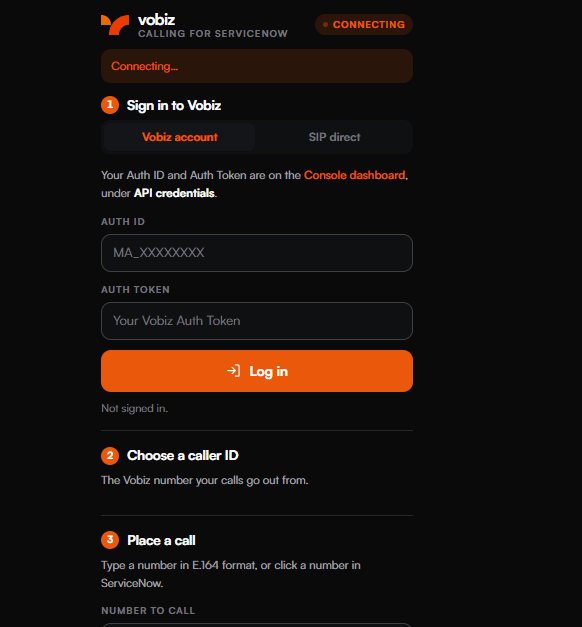
The panel before sign-in.
Vobiz account (recommended)
Enter the account’s Auth ID (it looks likeMA_XXXXXXXX) and Auth Token, and press Log in. The backend checks them with Vobiz, then sets up everything the account needs:
- An application named ServiceNow Calling (Vobiz), with its answer URL and hangup URL set to
<your backend>/answer(POST). If the account already has an application with exactly that answer URL, it is reused. No other application is changed. - One SIP endpoint per agent, attached to that application. It is reused at every later sign-in, and each sign-in gives it a new random password that only that browser session receives.
- The caller-ID list. Choose a caller ID lists every active, voice-enabled number on the account, and shows which application each is attached to now. Outgoing calls can only use a number on this list.
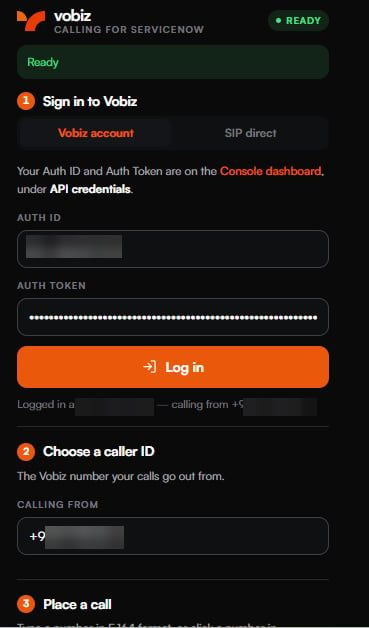
Signed in. The badge reads READY and the account is shown.
Enable inbound calls
Calls to your number reach the softphone only after you route them there. Pick the number under Choose a caller ID, then press Enable inbound calls under Receive calls here. This attaches the number to the ServiceNow Calling (Vobiz) application.SIP direct
Use this when you already have a Vobiz SIP endpoint and do not want to give the backend an Auth Token. Enter the endpoint’s SIP username and SIP password, and under Calling from a number on the same Vobiz account in international format (+91XXXXXXXXXX). Press Connect.
The browser registers with Vobiz using the password directly. The backend never receives the password and holds no account credentials; it only remembers which caller ID this endpoint uses, and that calls to that number ring it. Remember the username and caller ID keeps those two in the browser; the password is never stored.
Before you use SIP direct, attach the endpoint and the number to an application whose answer URL is your backend.
In the Vobiz Console:
- Voice → Applications → New. Set Answer URL and Hangup URL to
https://calling.example.com/answer, method POST. - Voice → Endpoints, open your endpoint, and choose that application.
- Open the phone number and attach the same application.
Agent identity
The softphone identifies the agent by theagentId in its URL. This matters in three places:
- Each
agentIdgets its own SIP endpoint. Two agents with the sameagentIdshare one endpoint, and each sign-in resets the other’s password, so the other panel drops out of READY. - Call via Vobiz finds the agent’s panel by the ServiceNow user name of the person who pressed the button. It reaches your panel only if your
agentIdis your ServiceNow user name. - Call logging assigns the interaction to the ServiceNow user whose user name equals the
agentId.
agentId to the agent’s ServiceNow user name. An OpenFrame configuration has one URL for everyone in its user group, so for several agents either create one configuration per agent (each for a group that contains only that agent), or have agents open the softphone in a browser tab at their own URL. Without an agentId, the browser makes up its own id and keeps it; calling and inbound work, but interactions are not assigned to the agent, and Call via Vobiz cannot reach the panel: the button rings only a panel signed in as the person who pressed it, never another agent’s.
Using it
Make a call
- Wait for the badge to read READY. The Call button stays disabled until then.
- Pick the caller ID under Choose a caller ID (Vobiz account sign-in only).
- Type the number in international format, such as
+91XXXXXXXXXX, and press Call or Enter. - Press Hang up to end the call.
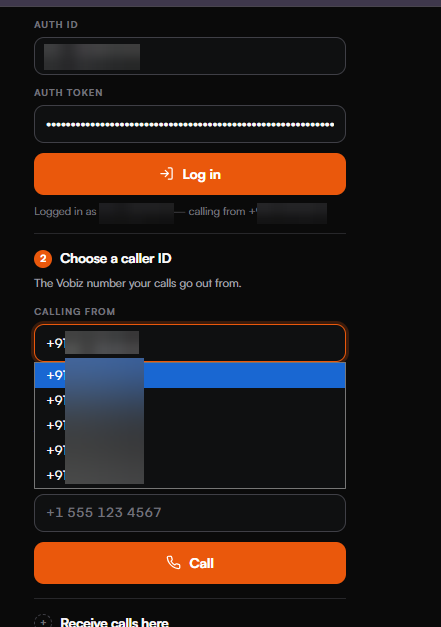
Choosing the caller ID.
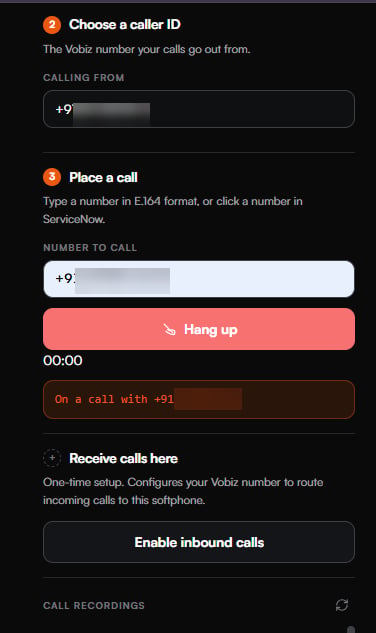
An active call.
Call from a record
Open a user, contact, incident or case and press Call via Vobiz. The button uses the record’s Mobile phone, then Phone, then Business phone. On an incident it calls the Caller; on a case, the Contact. Your softphone must be open, signed in with a Vobiz account, and READY when you press the button. ServiceNow shows “Calling +91XXXXXXXXXX from your Vobiz panel.” and the panel dials within two seconds. If the panel is already on a call, it does not dial. A request no panel collects expires after 30 seconds. Only your own panel is rung: one whoseagentId is your ServiceNow user name. If you have none open, ServiceNow shows <your user name> has no Vobiz panel open and nothing is dialled, even if other agents’ panels are open.
The call’s interaction names the record you pressed the button on (Started from: incident <sys_id>), and the backend adds a work note to that record naming the interaction. Tables without work notes, such as sys_user, get no note.
If your instance sends OpenFrame communication events when an agent clicks a phone number, the panel dials those too.
Receive a call
After Enable inbound calls, a call to the number rings every agent of that account who is signed in. The panel opens, plays a ring tone and shows the customer’s number (the backend passes it as the call’s caller name, because the SIP caller ID has to be your own number). Press Accept or Enter to answer, Decline or Escape to reject. If nobody from the account is signed in, the caller hears “Sorry, no one is available to take your call right now” and the call ends.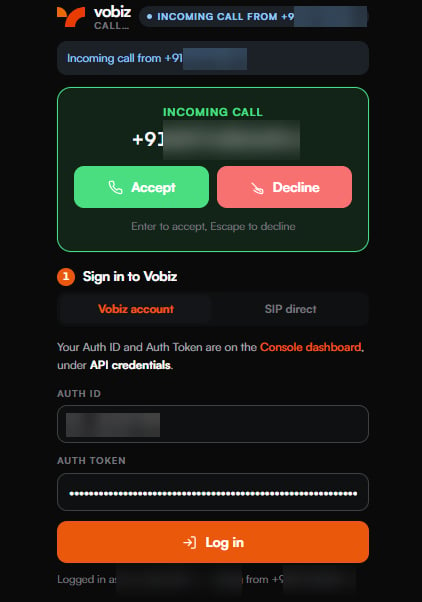
An incoming call.
Call logging
When a call ends, the softphone tells the backend, which creates one record in the ServiceNowinteraction table through the Table API:
recording_url and adds a work note with the recording link.
An inbound call rings several agents but is logged once. The backend learns from Vobiz which panel answered, and only that panel’s report is logged, assigned to that agent; the panels that only rang are ignored. A call nobody answers is logged once by the backend as Vobiz Missed Inbound Call, with 0 seconds and no agent.
Logging needs SERVICENOW_INSTANCE_URL, SERVICENOW_USER and SERVICENOW_PASSWORD. If any is missing, calls work but nothing is logged.
Recordings
Every call is recorded, as MP3, for up to an hour. The Call recordings section of the panel lists the account’s 10 most recent recordings with a player; the refresh icon reloads it.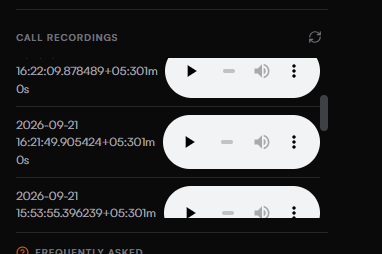
Recordings, with inline players.
RECORDING_URL_TTL_SECONDS (300 seconds by default); links written into interaction work notes expire after RECORD_LINK_TTL_SECONDS (7 days by default).
Configuration reference
The backend readsbackend/.env at startup. Variables already set in the environment take precedence.
vobiz.calling.tunnel_url and vobiz.calling.shared_secret.
Deploying to production
- Use a stable HTTPS hostname and set
PUBLIC_BASE_URL. A quick tunnel gets a new hostname every time it starts. When the hostname changes, updatePUBLIC_BASE_URL, thevobiz.calling.tunnel_urlproperty and the OpenFrame URL, have agents sign in again, and press Enable inbound calls again. - Run exactly one instance. Sessions, signed-in accounts and in-progress calls are held in memory.
- Keep
DATA_DIRon persistent storage, so agents keep the same SIP endpoint across restarts and redeploys. - Set
SIGNING_SECRETandVOBIZ_SHARED_SECRETto long random values, and keepbackend/.envout of version control. - Use a dedicated ServiceNow user with create and update on
interactionand read onsys_user. - If you serve the softphone from another domain, add it to
ALLOWED_ORIGINS.
Security and privacy
- Your Auth Token stays on the backend. It is checked with Vobiz at sign-in, kept in memory only, and never logged, written to disk or sent to the browser.
- Nothing secret is stored on disk.
endpoints.jsonholds endpoint ids and SIP usernames only.backend/.envholds your ServiceNow credentials and the two secrets. - The browser receives a session token, the Auth ID, the account’s phone numbers, and the SIP credentials of its own endpoint, which change at every sign-in.
- Recording links are signed and expire. Each works for one recording on one account. The backend fetches audio only from Vobiz hosts, never from an address in a request.
- Click-to-call is authenticated and per agent. It needs the shared secret or a signed-in session, rings only a panel signed in as the requesting agent (never another agent’s or another account’s), and outgoing caller IDs must be numbers on the signed-in account.
- Only allowed origins (
*.service-now.com,localhostandALLOWED_ORIGINS) can call the backend from a browser. - Webhooks are not signature-checked. The backend acts on a Vobiz webhook only for SIP users and numbers of accounts signed in to it.
- Recordings are visible across the account. Any agent signed in with an account sees that account’s recent recordings in the panel.
Troubleshooting
The backend log shows each call:WEBHOOK /answer received, then DIAL RESULT status=... bleg=... and RECORDING READY. If bleg is (none), the customer’s leg was never created.
Sign-in says "Vobiz did not accept this Auth ID and Auth Token"
Sign-in says "Vobiz did not accept this Auth ID and Auth Token"
Sign-in says "This backend has no public HTTPS address"
Sign-in says "This backend has no public HTTPS address"
PUBLIC_BASE_URL is not set and no tunnel is running. Set PUBLIC_BASE_URL to an https:// URL, or run npm run tunnel.Sign-in says "could not set up calling on this account"
Sign-in says "could not set up calling on this account"
The caller-ID list says "No numbers found on this account"
The caller-ID list says "No numbers found on this account"
The badge never reads READY
The badge never reads READY
registrar.vobiz.ai, or VOBIZ_REGISTRAR) on port 5063 over a secure WebSocket, or another panel signed in with the same agentId and reset the endpoint’s password. Allow the connection through your network, and give each agent their own agentId. In SIP direct, a wrong SIP username or password also stops registration."No microphone access" or "Microphone permission was denied"
"No microphone access" or "Microphone permission was denied"
An outbound call ends at once with "This phone is not signed in"
An outbound call ends at once with "This phone is not signed in"
Call via Vobiz fails with Status 401
Call via Vobiz fails with Status 401
vobiz.calling.shared_secret is empty or differs from VOBIZ_SHARED_SECRET. Set both to the same value.Call via Vobiz fails with Status 409
Call via Vobiz fails with Status 409
<your user name> has no Vobiz panel open means no softphone is open and signed in on the Vobiz account tab as you. Other agents’ panels are never used. Open the panel, sign in, wait for READY, and press the button again. If it is open, your panel’s agentId is probably not your ServiceNow user name: see Agent identity.Calls to your number are not answered, or reach another system
Calls to your number are not answered, or reach another system
The caller hears "no one is available"
The caller hears "no one is available"
Everything stopped after the tunnel restarted
Everything stopped after the tunnel restarted
vobiz.calling.tunnel_url and the OpenFrame URL, have agents sign in again, and press Enable inbound calls again. Use a stable hostname in production.No interaction records appear in ServiceNow
No interaction records appear in ServiceNow
SERVICENOW_* variables. If the backend log shows ServiceNow refused the interaction (HTTP 403), give the user create and update access on interaction.A recording link says it is invalid or has expired
A recording link says it is invalid or has expired
RECORD_LINK_TTL_SECONDS (7 days by default), or SIGNING_SECRET changed when the backend restarted. Play the call from the panel. Set SIGNING_SECRET, and raise RECORD_LINK_TTL_SECONDS if you need longer-lived links.A recording link asks you to sign in again
A recording link asks you to sign in again
Operating notes
- Restarting the backend signs everyone out. Agents sign in again, and an account’s recording links play once someone from it signs in.
- Run one backend instance. State is held in memory.
- Sessions last 12 hours.
- Recording links in work notes last
RECORD_LINK_TTL_SECONDS(7 days by default). - A Vobiz account sign-in gives you the caller-ID list, inbound setup, recording playback and Call via Vobiz.
- Call via Vobiz uses the agent’s open, READY panel, and reaches it when
agentIdis the agent’s ServiceNow user name. - The source record is linked by a work note, on tables that have work notes.
- Each panel handles one call at a time.
- Per call: 30 seconds of ringing, 4 hours of talk and 1 hour of recording.
Next steps
- Source code and README →
- SIP Endpoints → - the endpoints sign-in creates per agent, or the one you bring to SIP direct.
- Voice Applications → - answer URLs, hangup URLs and attaching numbers.
- Pipedrive integration → - the same softphone architecture in a sales CRM.