

Features
Click-to-call
Inbound calls
Contact lookup
Call logging
Recordings
Caller ID, agents and accounts
How it works
- You run the backend on a public HTTPS URL. It serves the softphone page and receives Vobiz webhooks.
- When an agent signs in, the backend creates (or reuses) an application and a SIP endpoint in their Vobiz account, and gives the browser fresh SIP credentials for that endpoint.
- The softphone registers with the Vobiz registrar over secure WebSocket. Audio flows between the browser and Vobiz, not through your backend.
- Outbound: the browser places the call. Vobiz asks your backend’s
/answerURL what to do, and the backend tells Vobiz to dial the customer from your chosen caller ID and record the call. - Inbound: Vobiz asks
/answer, and the backend rings every signed-in agent on the account that owns the number. - When the recording is ready, Vobiz calls
/recording-callback. The backend looks up the caller in Pipedrive, writes the Activity and the Call Log, and uploads the audio.
Prerequisites
Set up
Install the backend
backend/.env:backend/.env holds deployment settings only. No Vobiz Auth ID, Auth Token, SIP credentials or numbers go in it. Agents sign in with their own account.Start it and expose it over HTTPS
npm run tunnel starts a Cloudflare quick tunnel and the backend picks up its URL when TUNNEL_URL is empty.Check that Vobiz can reach the answer URL
<Response> (for this test, a short message and <Hangup/>). A 404 page or a tunnel warning page means calls will fail.Create the Pipedrive app
- Callback URL:
https://calling.example.com/auth/pipedrive/callback. It must matchPIPEDRIVE_REDIRECT_URIexactly. - Scopes: turn on only these.
backend/.env and restart the backend:Connect Pipedrive
https://calling.example.com/auth/pipedrive in a browser where you are signed in to Pipedrive, and approve the app. The page then says Connected to Pipedrive. To check at any time:backend/.pipedrive-tokens.json and refreshes them on its own. To connect a different company later, disconnect first: sign in on the Vobiz account tab and press Disconnect Pipedrive (it asks for confirmation and affects everyone on this backend), or call POST /auth/pipedrive/disconnect with a signed-in session’s Authorization: Bearer <token>.Open the softphone and sign in
Sign in
The softphone has two tabs under Sign in to Vobiz.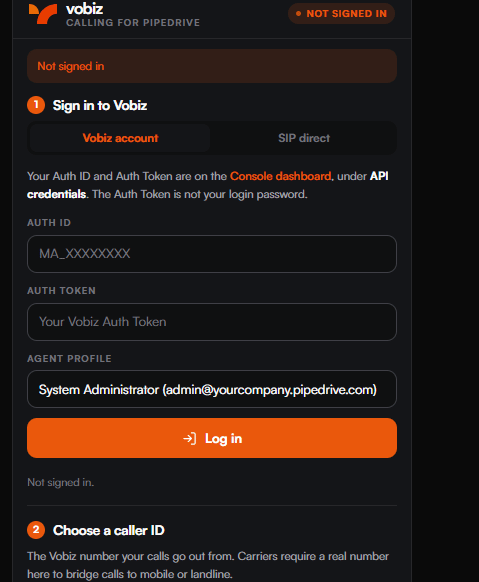
The panel before sign-in.
Vobiz account (recommended)
Enter your Auth ID (MA_XXXXXXXX) and Auth Token, choose an Agent Profile, and press Log in. Any Vobiz account can sign in, and several accounts can share the same backend. You do not create anything in the Vobiz Console by hand. On sign-in the backend:
- Checks the Auth ID and Auth Token with Vobiz. If Vobiz rejects them, so does the softphone.
- Finds or creates an application named
Vobiz-Pipedrive-Callingin your account, with Answer URLhttps://calling.example.com/answer, Hangup URLhttps://calling.example.com/hangup-callbackand Fallback URLhttps://calling.example.com/fallback(all POST). It reuses an application whose answer URL already points at this backend, or the one it created earlier under that name. It never changes any other application. - Finds or creates one SIP endpoint per agent profile, with the alias
pipedrive-<profile>, attaches it to that application, and sets a new random SIP password that only this browser session receives. - Loads your account’s active, voice-enabled numbers into Choose a caller ID.
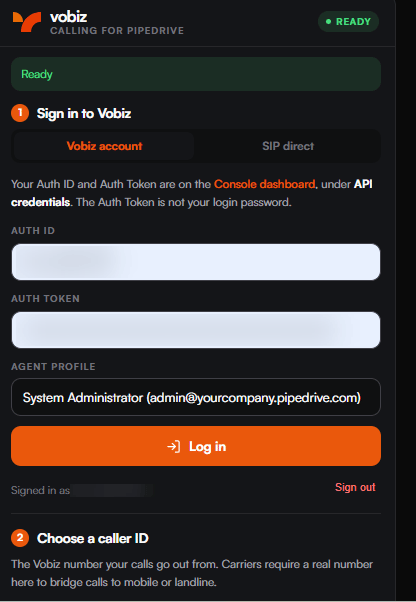
Registered. The badge reads READY.
Choose a caller ID
Choose a caller ID lists your account’s active, voice-enabled numbers. Outbound calls show the number you pick, and the backend refuses any other number.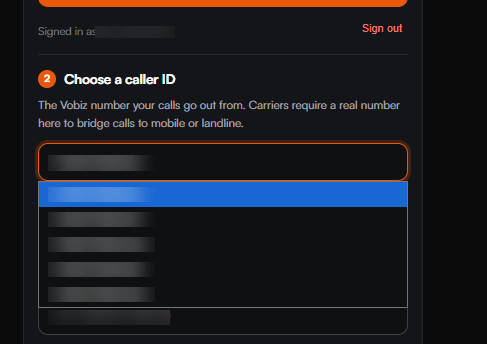
Selecting the outbound caller ID.
Enable inbound calls
Signing in does not change where your numbers route. To take inbound calls on a number:- Select the number under Choose a caller ID. The line below shows where its inbound calls go now.
- Press Enable inbound calls on this number and confirm.
Vobiz-Pipedrive-Calling application (Attach a number to an application).
Inbound calls ring every agent signed in to the account that owns the number, at the same time. The first to accept gets the call. If nobody from that account is signed in, the caller hears a short message and the call ends.
SIP direct
Use this tab to sign in as an existing Vobiz SIP endpoint without giving the backend your account credentials. Enter the endpoint’s SIP Username (the user part of itssip_uri) and SIP Password, and a Calling From (Caller ID) number on the same account in E.164 format (+91XXXXXXXXXX). Press Connect. The password stays in the browser and is never sent to the backend or saved. Inbound calls to the caller-ID number ring this softphone.
Because the backend holds no credentials for your account, you point the endpoint and the number at an application whose answer URL is your backend:
- Vobiz Console
- API
- Voice → Applications: create an application with Answer URL
https://calling.example.com/answer(POST) and Hangup URLhttps://calling.example.com/hangup-callback(POST). - Voice → Endpoints: open your endpoint and set its Application to the new application.
- Phone Numbers: open your number and set its Application to the same application.
VOBIZ_WEBHOOK_SIGNATURES=require.Using it
Outbound calls
- Pick a caller ID under Choose a caller ID.
- Type the number in E.164 format (
+91XXXXXXXXXX) or use the keypad. As you type, the panel shows the matching Pipedrive contact. - Press Call (or Enter). While connected, use Mute, Hold and the keypad for DTMF. Press Hang up to end the call.
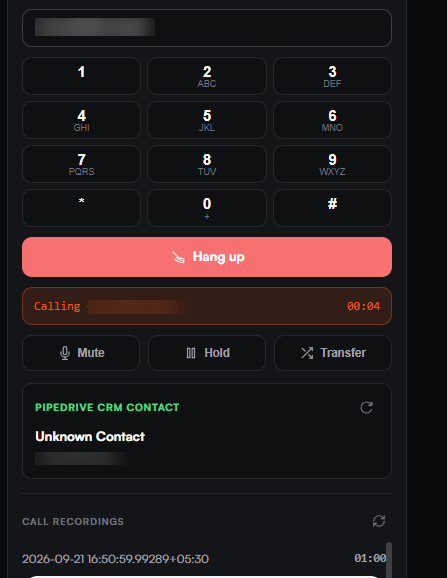
An active call, with in-call controls and the matched Pipedrive contact.
Inbound calls
An incoming call shows the caller’s number and the matching Pipedrive contact. Press Accept (Enter) or Decline (Escape). Keep the softphone tab open to receive calls.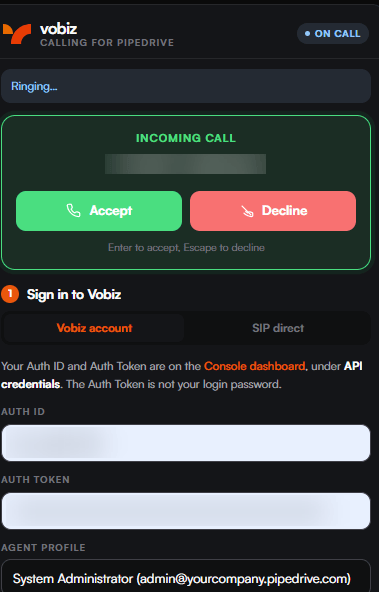
The inbound prompt, with keyboard shortcuts.
What is written to Pipedrive
When Vobiz reports that a call’s recording is ready, the backend writes two records. Their owner is the agent profile’spipedriveUserId when it is set (for outbound calls, and inbound calls that rang only that agent); otherwise the Pipedrive user who authorized the app:
- An Activity of type Call, marked done, with the subject
Vobiz Outbound call - +91XXXXXXXXXX(orInbound), the duration rounded up to the minute, and a note with the call UUID, direction, numbers, agent, duration, hangup cause and a Listen link to the recording. - A Call Log, with the outcome (
connected,busyorno_answer), from and to numbers, start and end time, duration, and the recording audio uploaded to it.
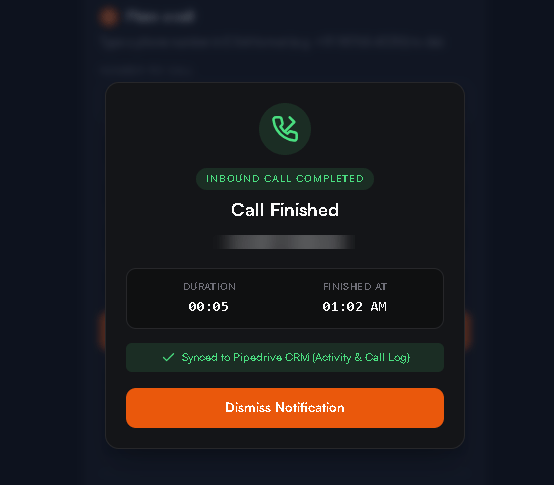
Call finished.
Recordings
Every call is recorded as MP3. You can play it:- In Pipedrive, on the Call Log. The audio is uploaded there and stays playable for as long as the Call Log exists.
- From the Activity note’s Listen link. The link is signed and expires after 15 minutes by default (
RECORDING_URL_TTL_SECONDS). - In the softphone, under Call recordings. It lists your account’s 10 most recent recordings, each with a fresh signed link.
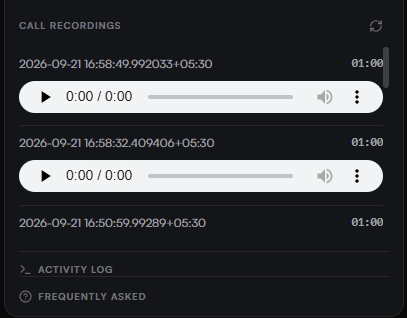
Recordings, with inline players.
Backfilling missed calls
To log recent calls that were not written, for example while Pipedrive was not connected, run this while the backend is running. It writes your account’s 10 most recent CDRs to Pipedrive:admin profile, which disconnects a browser signed in as admin on that account.
Configuration
All settings go inbackend/.env. Variables already set in the environment take precedence.
Production checklist
- HTTPS on a stable hostname. Vobiz must reach
/answer,/fallback,/dial-status,/recording-callbackand/hangup-callback, and browsers only allow the microphone on HTTPS. - Exactly one backend instance. Sign-ins, sessions and in-progress calls are held in memory.
- Persistent storage for
DATA_DIRand the Pipedrive token file. Both are written with mode0600. - A fixed
SIGNING_SECRET, so recording links survive restarts. TUNNEL_URLset before anyone signs in. If it changes, restart and have each account sign in again, which updates theVobiz-Pipedrive-Callingapplication. Update the Pipedrive app’s Callback URL andPIPEDRIVE_REDIRECT_URIyourself.- Strict webhook signatures. After one call, look for
[signature] valid Vobiz signaturein the log, then setVOBIZ_WEBHOOK_SIGNATURES=require(unless you use SIP direct). See Validating callbacks. - Restricted access if only your company should use the backend. Any Vobiz account can sign in, and every account’s calls are logged to the one connected Pipedrive company.
- A process manager that restarts the backend on failure. After a restart, agents sign in again.
Security and privacy
- Your Auth Token never leaves the server and is never stored on disk. The browser sends it once at sign-in and gets an opaque session token back, valid for 12 hours.
- On disk: endpoint IDs and SIP usernames, and the Pipedrive OAuth tokens, both mode
0600. No SIP passwords and no Vobiz tokens. - The browser receives its session token, the SIP credentials for its own endpoint, your account’s numbers and signed recording links. Each sign-in sets a new random SIP password.
- Recording links carry no credentials. They are signed, expire, and work for one recording of one account only.
- Every route that places calls, reads recordings, or reads or writes CRM data requires a signed-in session, and acts only on that session’s account. Caller IDs are limited to the account’s own numbers.
- The backend changes only its own resources in your Vobiz account: the
Vobiz-Pipedrive-Callingapplication and itspipedrive-*endpoints. A number moves only when you press Enable inbound calls. - CORS is an allowlist, and Vobiz webhook signatures are checked with the Auth Token of the account each call belongs to.
Troubleshooting
The backend log shows each step of a call. The most useful line is[DIAL RESULT] ... bleg=<uuid>. If bleg reads (none — B leg never originated), Vobiz never reached the other party.
Sign-in says “Vobiz did not accept that Auth ID and Auth Token”
Sign-in says “Vobiz did not accept that Auth ID and Auth Token”
Sign-in says “This server has no public URL (TUNNEL_URL)”
Sign-in says “This server has no public URL (TUNNEL_URL)”
TUNNEL_URL is empty. Set it in backend/.env and restart.The badge shows “Registration failed”
The badge shows “Registration failed”
sip_uri.The badge stays on “Connecting…”
The badge stays on “Connecting…”
wss://registrar.vobiz.ai:5063. Check the backend log and the firewall.Outbound: you hear “This phone is not signed in”
Outbound: you hear “This phone is not signed in”
Outbound: the call fails at once
Outbound: the call fails at once
bleg=(none…), the destination is unreachable, the caller ID is not on the account, or the balance is too low. If you hear This Vobiz account has no phone number to call from, activate a voice-enabled number and sign in again.Nothing reaches the backend at all
Nothing reaches the backend at all
TUNNEL_URL is stale, or the endpoint is not attached to the application (the sign-in log says NOT bound). Fix TUNNEL_URL, restart and sign in again. In SIP direct, attach the endpoint yourself.Inbound calls never ring, or the caller hears “no one is available”
Inbound calls never ring, or the caller hears “no one is available”
The log shows “[signature] INVALID” and Vobiz gets 403
The log shows “[signature] INVALID” and Vobiz gets 403
TUNNEL_URL does not match the URL Vobiz is calling. Set it to the exact public URL, restart, and sign in again.No Activity or Call Log appears in Pipedrive
No Activity or Call Log appears in Pipedrive
GET /auth/pipedrive/status for "connected": true. Unanswered calls are not logged. If the Activity has no person, add the phone number to the person in Pipedrive.The Listen link says it is invalid, expired, or asks you to sign in
The Listen link says it is invalid, expired, or asks you to sign in
RECORDING_URL_TTL_SECONDS, and all links stop working if the backend restarts without a fixed SIGNING_SECRET. Play the audio on the Call Log or from the softphone’s recordings list. If the link asks you to sign in, the backend restarted: sign in with that account, then reopen the link.Limitations
- Sign in again after every backend restart. Until someone from an account does, its calls get a short message and hang up, and its recording links ask you to sign in.
- Run one backend instance. State is held in memory.
- One Pipedrive company per backend. Every signed-in Vobiz account’s calls are logged to that company.
- Unanswered calls are not logged, because logging happens when the recording is ready.
npm run fetch-cdrcan backfill, without de-duplication. - Deals are linked only when unambiguous: a contact with several open deals gets no deal link.
- One browser per agent profile.
- The softphone runs in its own browser tab. It does not yet run as an embedded Pipedrive panel or floating window, and it is not listed on the Pipedrive Marketplace.
- SIP direct has no recordings, number list, contact lookup or Enable inbound calls, and does not work with
VOBIZ_WEBHOOK_SIGNATURES=require. - No call transfer.
Next steps
- Get the code: vobiz-ai/Vobiz-Pipedrive-Calling
- Other CRMs: Zendesk, HubSpot, Freshdesk
- Reference:
<Dial>,<Record>, SIP endpoints, Validating callbacks