Pipecat integration
Pipecat connects to Vobiz SIP trunking to power AI voice pipelines on real phone calls - WebSocket streaming and SIP trunk setup across 130+ countries.
This integration combines Vobiz telephony with the Pipecat voice agent framework to build intelligent AI-powered phone calls.
Overview
What you'll build: An outbound calling system with real-time AI conversations powered by OpenAI (STT → LLM → TTS), automatic call recording, and bidirectional audio streaming.
Features
-
AI Voice Conversations: Natural conversations powered by OpenAI GPT + TTS/STT
-
Outbound Calling: Trigger calls via REST API from anywhere
-
Automatic Recording: All conversations automatically recorded and saved
-
Real-time Streaming: Bidirectional audio via WebSockets
Prerequisites
Installation
Clone the repository
bashgit clone https://github.com/vobiz-ai/Vobiz-X-Pipecat cd Vobiz-X-Pipecat
Install dependencies
bashpip install -r requirements.txt
ℹ️ Note: This installs FastAPI, Pipecat, OpenAI SDK, and other required packages.
Configure environment
The repo ships an env.example file. Copy it and fill in your values:
bashcp env.example .env
bash# Required OPENAI_API_KEY=sk-... VOBIZ_AUTH_ID=MA_XXXXXXXX VOBIZ_AUTH_TOKEN=your-token-here PUBLIC_URL=https://your-ngrok-url.ngrok-free.app # Optional VOBIZ_PHONE_NUMBER=+918065480214 # default `from` for the /start endpoint DEEPGRAM_API_KEY=... # use Deepgram for STT instead of OpenAI
Where to find these values:
OPENAI_API_KEY- OpenAI Platform → API KeysVOBIZ_AUTH_ID- Vobiz Console → Account SettingsVOBIZ_AUTH_TOKEN- Vobiz Console → Account SettingsPUBLIC_URL- Your ngrok URL (set in Step 2 of Usage)VOBIZ_PHONE_NUMBER(optional) - Vobiz number used as the caller-ID for/startDEEPGRAM_API_KEY(optional) - drop-in alternative to OpenAI Whisper for STT
Usage
Start the server
bashpython server.py
The server runs on http://0.0.0.0:7860.
Start ngrok
In a new terminal, expose your local server:
bashngrok http 7860
Copy the ngrok URL from the output (for example, https://abc123.ngrok-free.app).
⚠️ Warning: Important: Update
PUBLIC_URLin your.envfile with this ngrok URL, then restart the server.
Make a call
There are two ways to trigger an outbound call - pick whichever fits your stack.
The repo exposes `POST /start` on the local server. It wraps the Vobiz Call API and auto-fills `answer_url` from your `PUBLIC_URL`, plus uses `VOBIZ_PHONE_NUMBER` as `from` when set.

```bash
curl -X POST http://localhost:7860/start \
  -H "Content-Type: application/json" \
  -d '{ "to": "+919148223344" }'
```
Direct Vobiz API
bashcurl -X POST https://api.vobiz.ai/api/v1/Account/YOUR_AUTH_ID/Call/ \ -H "X-Auth-ID: YOUR_AUTH_ID" \ -H "X-Auth-Token: YOUR_AUTH_TOKEN" \ -H "Content-Type: application/json" \ -d '{ "from": "+918011223344", "to": "+919148223344", "answer_url": "https://your-ngrok-url.ngrok-free.app/answer", "answer_method": "POST" }'
What happens next:
- Phone rings at the "to" number
- When answered, Vobiz requests XML from your server's
/answerendpoint - Server returns a WebSocket URL pointing at
/ws - Audio streams bidirectionally to the Pipecat bot
- AI assistant speaks and listens (STT → LLM → TTS)
- Conversation is automatically recorded; MP3 fetched via
/recording-ready
Receiving inbound calls
Configure your Vobiz number to handle incoming calls with your Pipecat agent.
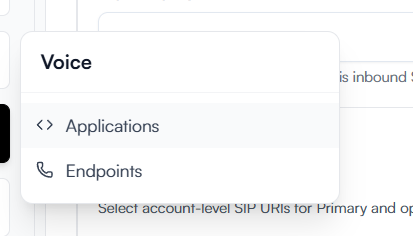
Open Applications
Log in to the Vobiz Console and navigate to the Applications section in the sidebar.
Create an application
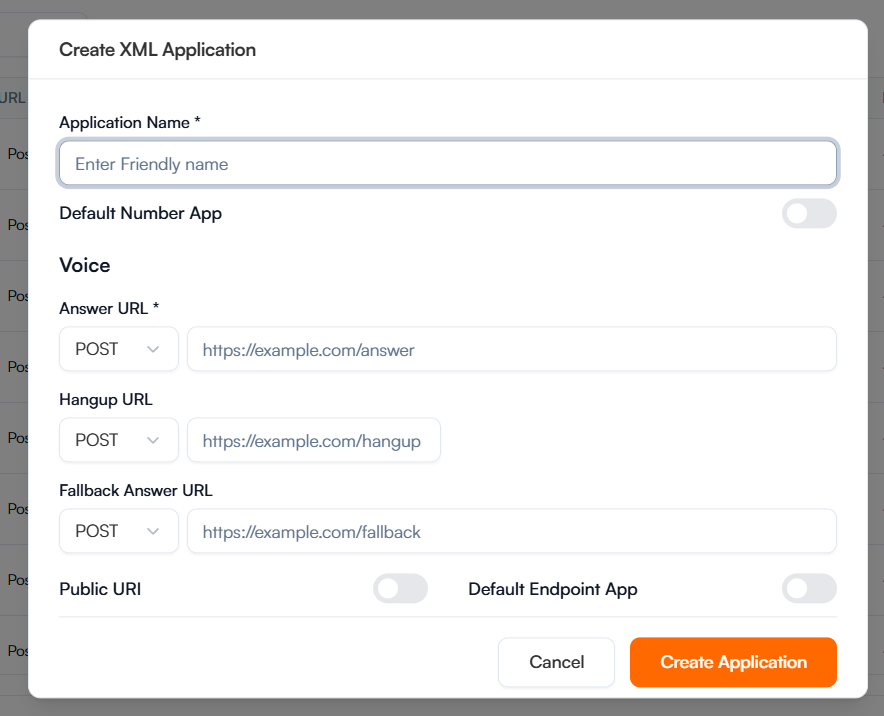
Click Create New Application and give it a name (for example, "Pipecat Agent").
Configure URLs
Set the Answer URL to your ngrok URL (for example, https://.../answer) and select POST method. You can use the same URL for Hangup or leave it blank.

Assign phone number
Go to Phone Numbers, select your number, and assign it to the application you just created.

✅ Success: Success: Calls to your Vobiz number will now be handled by your local Pipecat server!
Quick reference
Server endpoints
| Endpoint | Method | Description |
|---|---|---|
/start | POST | Trigger an outbound call. Body: { "to": "+91..." }. Wraps the Vobiz Call API. |
/answer | POST | Called by Vobiz when the call is answered. Returns XML pointing at /ws. |
/ws | WebSocket | Bidirectional audio between Vobiz and the Pipecat bot. |
/recording-finished | POST | Vobiz callback when recording stops. Logs metadata. |
/recording-ready | POST | Vobiz callback when the recording is ready. Auto-downloads the MP3 via download_recording.py. |
Project files
| File | Purpose |
|---|---|
server.py | FastAPI app - owns /start, /answer, /ws, and the recording callbacks |
bot.py | Pipecat pipeline - STT → LLM → TTS, runs per call |
download_recording.py | Helper used by /recording-ready to pull the MP3 from Vobiz |
requirements.txt | Python dependencies (FastAPI, Pipecat, OpenAI SDK, etc.) |
env.example | Template for your .env file - copy and fill in |
Customizing the bot
Edit bot.py to customize your AI assistant:
pythonmessages = [ { "role": "system", "content": "You are a friendly customer service agent..." }, ]
pythontts = OpenAITTSService( api_key=os.getenv("OPENAI_API_KEY"), voice="nova", # Options: alloy, echo, fable, onyx, nova, shimmer )
✅ Success: Integration complete!
You can now make AI-powered phone calls with Vobiz and Pipecat.
Next steps
- Customize your AI assistant's personality in
bot.py - Deploy to production (AWS/GCP/Heroku) instead of ngrok
- Add custom business logic and integrations
Resources
Vobiz Documentation
External Resources
Build it with an AI agent
<Prompt description="Clone, configure, and run the Vobiz-X-Pipecat repo - your first AI voice agent in ~5 minutes." icon="robot" actions={["copy", "cursor"]}
Using the Vobiz MCP at https://vobiz.ai/docs/mcp:
- Read the
vobiz-ai-voice-agentsskill frommintlify://skills/ai-voice-agentsand thevobiz-audio-streamsskill frommintlify://skills/audio-streams. - Clone
https://github.com/vobiz-ai/Vobiz-X-Pipecatinto the current directory. - Run
pip install -r requirements.txt(warn me first if I'm not in a virtualenv). - Copy
env.exampleto.envand ask me for:OPENAI_API_KEY,VOBIZ_AUTH_ID,VOBIZ_AUTH_TOKEN, my Vobiz number forVOBIZ_PHONE_NUMBER. LeavePUBLIC_URLandDEEPGRAM_API_KEYblank for now. - Explain how to start the FastAPI server (
python server.py) and how to expose it withngrok http 7860. Tell me to paste the ngrok HTTPS URL intoPUBLIC_URLand restart. - Show me the curl to fire my first AI-powered call via the local
/startendpoint:POST http://localhost:7860/startwith body{"to": "+91..."}. - Explain the call flow: Vobiz →
/answer→ returns XML pointing at/ws→ bidirectional audio → Pipecat pipeline (STT → LLM → TTS) → MP3 recording delivered to/recording-ready.
Explore More Integrations
3CX integration
Connect 3CX PBX to Vobiz SIP trunking for inbound and outbound calling across 130+ countries - configure a generic SIP trunk in minutes.
Agora Integration
Connect an Agora Conversational AI agent to Vobiz SIP trunking - add a Vobiz number to Agora for outbound campaigns and route inbound calls to your agent, including India and 130+ countries.
Bolna integration
Bolna ships Vobiz as a built-in telephony provider. Paste two credentials into the Providers screen and your agents place and answer calls on numbers in 130+ countries, reaching 190, with audio streaming rather than a SIP trunk.
We use cookies to run this site and, with your permission, to understand how it's used. Read our Cookie Policy.