LiveKit integration
LiveKit connects to Vobiz SIP trunking for real-time AI voice agents - inbound and outbound calling across 130+ countries with dispatch rules and trunk setup.
Overview
This guide shows how to integrate LiveKit with Vobiz to enable outbound calling and inbound answering for your AI agents.
Prerequisites
Before you start:
Part 1: Vobiz setup
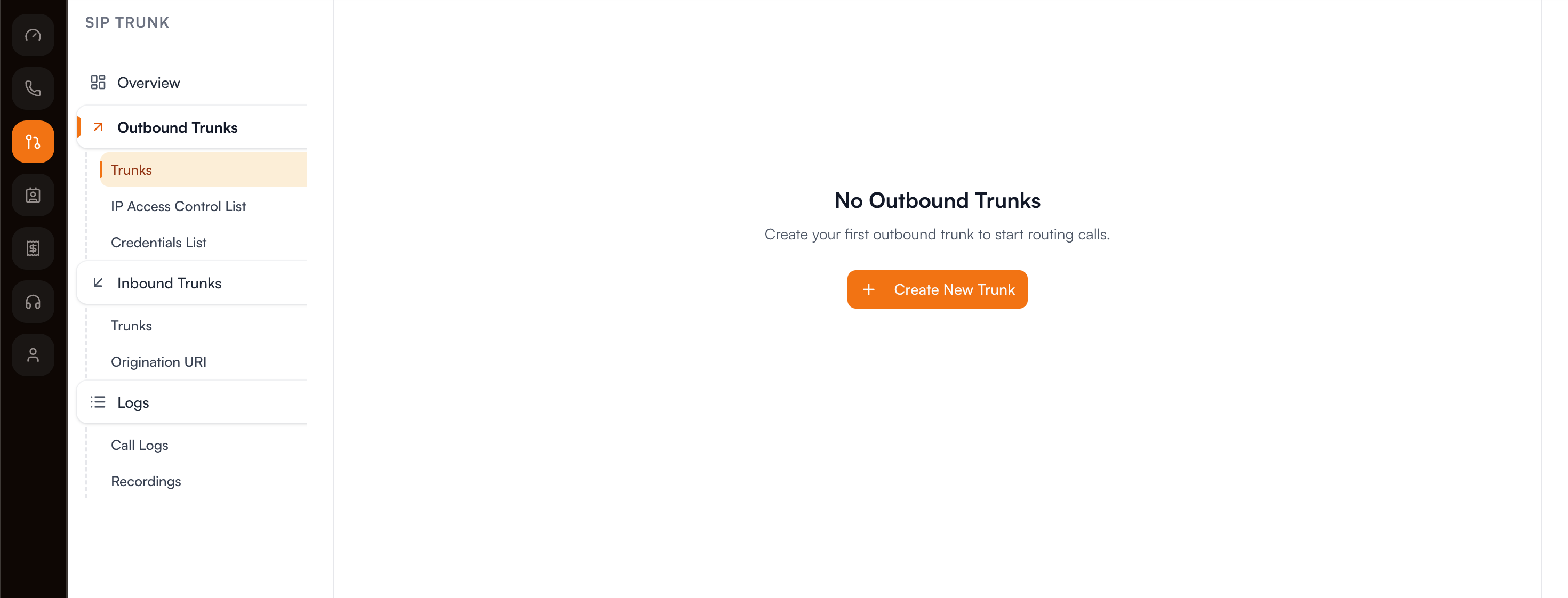
-
Log in to the Vobiz Console
-
In the left sidebar, navigate to SIP Trunk > Outbound Trunks > Trunks
-
Click + Create Trunk
-
Enter a Trunk Name (for example, "LiveKit Integration") and an optional Description
-
Under Authentication & Linking, select a Credential from the Credentials List (or click + Create New Credential if you don't have one)
-
Click + Create Trunk at the bottom right to save
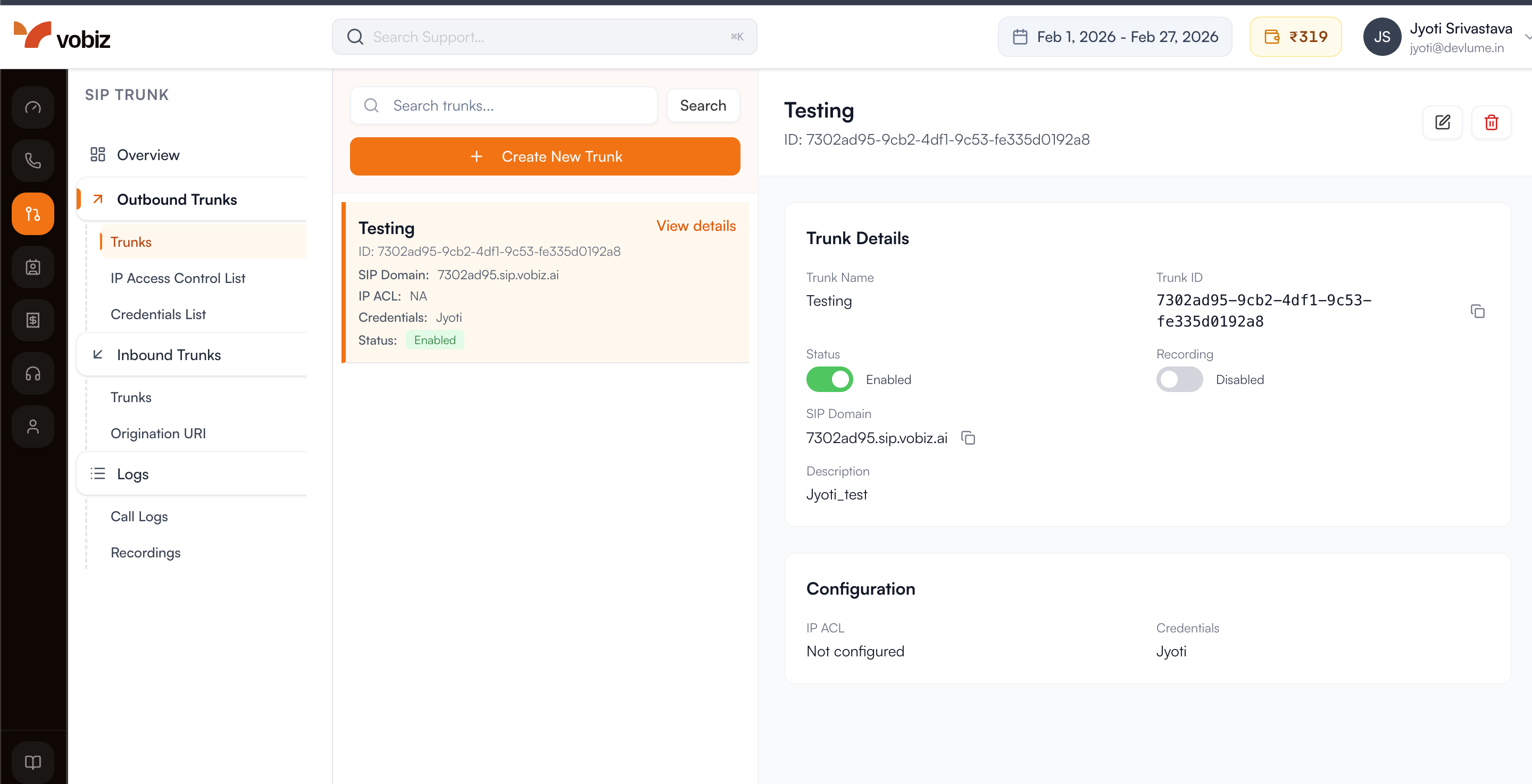
After creating the trunk, copy your credentials from the Authentication & Linking section:
| Field | Value |
|---|---|
| SIP Domain (Gateway URL) | <your_unique_domain>.sip.vobiz.ai |
| Username | <your_username> |
| Password | <your_password> |
✅ Success: You now have a dedicated bridge ready for voice traffic.
💡 Tip: Keep these handy - you'll paste them into your LiveKit code in Part 3.
Purchase a phone number for outbound caller ID or inbound calls. See phone numbers.
Part 2: LiveKit setup
-
Go to the LiveKit Cloud Dashboard and select your project.
-
Go to Settings > API Keys.
-
You need these three values:
Variable Where to find LIVEKIT_URLSettings > General LIVEKIT_API_KEYSettings > API Keys LIVEKIT_API_SECRETSettings > API Keys
bashLIVEKIT_URL=wss://your-project.livekit.cloud LIVEKIT_API_KEY=APIxxxxxxxxxxxxx LIVEKIT_API_SECRET=secretxxxxxxxxxx
Part 3: Connect LiveKit to Vobiz (outbound)
ℹ️ Note: For a complete working example, see the LiveKit Vobiz Outbound Repository.
pythonfrom livekit import api as livekit_api lk = livekit_api.LiveKitAPI( url="YOUR_LIVEKIT_URL", api_key="YOUR_LIVEKIT_API_KEY", api_secret="YOUR_LIVEKIT_API_SECRET" )
Connect LiveKit to your Vobiz SIP trunk using the credentials from Part 1:
pythontrunk = await lk.sip.create_sip_outbound_trunk( livekit_api.CreateSIPOutboundTrunkRequest( trunk=livekit_api.SIPOutboundTrunkInfo( name="Vobiz Trunk", address="YOUR_VOBIZ_SIP_DOMAIN", # sip_domain from Vobiz auth_username="YOUR_VOBIZ_USERNAME", # username from Vobiz auth_password="YOUR_VOBIZ_PASSWORD", # password from Vobiz numbers=["YOUR_PHONE_NUMBER"], # your Vobiz phone number ) ) ) # Save trunk.sip_trunk_id - you'll need it to make calls
✅ Success: Your LiveKit project is now securely linked to the Vobiz network.
Field mapping from Vobiz → LiveKit:
| Vobiz field | LiveKit field |
|---|---|
sip_domain | address |
username | auth_username |
password | auth_password |
| Your phone number | numbers (array) |
Part 4: Make outbound calls
pythonparticipant = await lk.sip.create_sip_participant( livekit_api.CreateSIPParticipantRequest( sip_trunk_id="YOUR_TRUNK_ID", # from Part 3 sip_call_to="+1234567890", # number to call (E.164) room_name="call-room", # LiveKit room name ) )
Call flow:
- LiveKit creates the call via Vobiz
- The person answers and joins the LiveKit room as a participant
- Your AI agent joins the same room
- The conversation begins
Part 5: Configure inbound calling
ℹ️ Note: For a complete working example, see the LiveKit Vobiz Inbound Repository.
-
In the LiveKit Cloud Dashboard, go to Settings > Project and find the SIP URI field.
textsip:your-sip-uri.sip.livekit.cloud -
Update your Vobiz trunk to route inbound calls to LiveKit. See Update Trunk.
⚠️ Warning: Remove the
sip:prefix when entering the destination in Vobiz. LiveKit showssip:your-sip-uri.sip.livekit.cloudbut you enteryour-sip-uri.sip.livekit.cloud.
bashPATCH https://api.vobiz.ai/api/v1/Account/{auth_id}/trunks/{trunk_id}
json{ "inbound_destination": "your-sip-uri.sip.livekit.cloud" }
-
In the LiveKit dashboard, go to Telephony > Trunks and click Create new trunk > Inbound. Configure:
- Phone Numbers: Your Vobiz number (for example,
+918071387434) - Allowed Addresses:
0.0.0.0/0(restrict this in production)
Click Create and save the Trunk ID.
- Phone Numbers: Your Vobiz number (for example,
-
Go to Telephony > Dispatch Rules and click Create new dispatch rule. Configure:
- Rule Type: Individual
- Room Prefix:
call- - Match Trunks: Select your inbound trunk
Expand the Agent dispatch section and set Agent Name to
voice-assistant(must match your agent exactly). Click Create.
Part 6: SIP call transfer
The LiveKit Voice Agent supports cold transfer via SIP REFER.
- Say "Transfer me" or "Transfer me to a live agent" → transfers to the default configured number
- Say "Transfer me to +1 555 000 1234" → transfers to the requested number
The agent constructs the SIP URI (sip:+15550001234@<your-sip-domain>) and initiates the transfer automatically.
| Error | Cause | Solution |
|---|---|---|
| Status 500 (Max Auth Retry) | Incorrect SIP credentials | Run python setup_trunk.py again to update credentials |
| Status 408 (Timeout) | Invalid SIP URI or blocked | Ensure VOBIZ_SIP_DOMAIN is set in .env. Verify "Call Transfer (SIP REFER)" is enabled |
| Status 400 (Invalid argument) | Destination is not a URI | Update code - sip: prefix and @domain are now added automatically |
| Disconnects but no ring | Transfer succeeded, destination failed | Check the destination number or SIP provider logs |
Troubleshooting
Call doesn't connect:
- Verify
addressin the LiveKit trunk matches your exact Vobizsip_domain - Check that credentials (
auth_username,auth_password) match exactly - Common mistake: using
sip.vobiz.aiinstead of your specific domain
SIP 401 Unauthorized:
- Verify credentials in Vobiz Console under Trunks
- Ensure the LiveKit trunk uses the same credentials
Insufficient balance:
- Check your balance at Vobiz Console and top up if needed
Call disconnects immediately:
- Confirm
inbound_destinationhas thesip:prefix removed - Verify your Vobiz phone number is added to the LiveKit inbound trunk
- Check that
allowed_addressesis set to0.0.0.0/0in the LiveKit trunk
Agent doesn't answer:
- Confirm the agent is running
- Verify the dispatch rule has "Agent dispatch" configured
- Check that the agent name matches exactly (for example,
voice-assistant) - Confirm the dispatch rule is linked to the correct inbound trunk
Quick reference
| Credential | Where to get | Used for |
|---|---|---|
Vobiz sip_domain | Vobiz trunk response | LiveKit trunk address |
Vobiz username | Vobiz trunk response | LiveKit trunk auth_username |
Vobiz password | Vobiz trunk response | LiveKit trunk auth_password |
| Vobiz phone number | Vobiz Numbers API | LiveKit trunk numbers |
| LiveKit SIP URI | LiveKit Settings | Vobiz inbound_destination |
| LiveKit trunk ID | After creating trunk | Making calls |
| Error | Cause | Fix |
|---|---|---|
| 401 Unauthorized | Credentials mismatch | Verify Vobiz username/password |
| Call fails silently | Wrong address | Use exact Vobiz sip_domain |
| Insufficient balance | Low credits | Add funds in Vobiz Console |
| Inbound disconnects | Wrong inbound_destination | Remove sip: prefix |
| Agent doesn't join | Missing agent dispatch | Configure agent name in dispatch rule |
Resources
Vobiz
LiveKit
Example repositories
Support
- Vobiz: support@vobiz.ai
- LiveKit: livekit.io/support
✅ Success: Integration complete!
Your LiveKit agents can now make and receive calls through Vobiz.
Explore More Integrations
3CX integration
Connect 3CX PBX to Vobiz SIP trunking for inbound and outbound calling across 130+ countries - configure a generic SIP trunk in minutes.
Agora Integration
Connect an Agora Conversational AI agent to Vobiz SIP trunking - add a Vobiz number to Agora for outbound campaigns and route inbound calls to your agent, including India and 130+ countries.
Bolna integration
Bolna ships Vobiz as a built-in telephony provider. Paste two credentials into the Providers screen and your agents place and answer calls on numbers in 130+ countries, reaching 190, with audio streaming rather than a SIP trunk.
We use cookies to run this site and, with your permission, to understand how it's used. Read our Cookie Policy.