The Complete Vobiz Developer Guide: From Signup to Your First Production Call (2026)
Set up the Vobiz telephony API from signup to your first production call — auth, SIP trunking, AI voice integrations, SDKs, and MCP tooling.
The Complete Vobiz Developer Guide: From Signup to Your First Production Call (2026)
Most telephony integrations stall for the same reason: nobody has written down, in one place, what happens between "I have an API key" and "calls are running in production." Vobiz is a global programmable telephony platform — SIP trunking, Voice API, and WebSocket audio streaming, available in 130+ countries with pay-per-minute pricing and no monthly commitments. This guide walks through every layer: account setup, authentication, your first call, connecting an AI voice platform, and the tooling Vobiz ships specifically for AI coding agents.
What Is the Vobiz API?
The Vobiz API is a REST and Voice XML interface for provisioning phone numbers, running SIP trunks, placing and controlling calls, and streaming live call audio — all from a single account.
It's built for developers connecting real phone numbers to AI voice platforms (Vapi, Retell AI, ElevenLabs, LiveKit, Pipecat), building outbound dialers, or running programmable IVR systems, rather than for teams that need a call-center dashboard with no code involved.
Everything runs off one base URL — https://api.vobiz.ai/api/v1 — documented in full at the Vobiz API Reference, with a machine-readable OpenAPI 3.0 specification available for anyone who wants to generate a client or feed the schema to a coding agent.
How Vobiz Fits Under Your Voice Stack
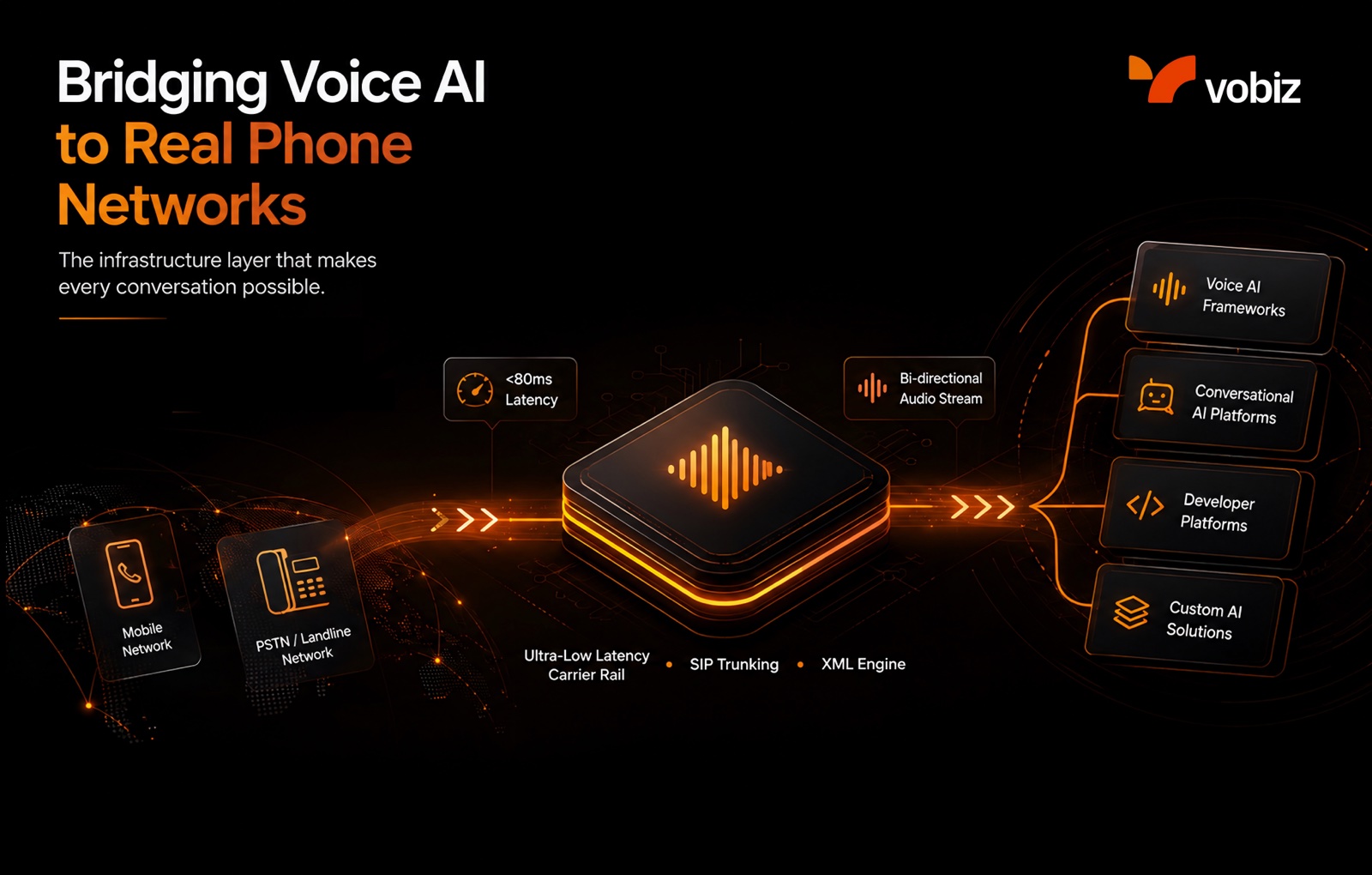
Vobiz doesn't build AI voice agents — it's the telephony layer underneath them. A production voice AI deployment typically has three parts working together:
- The telecom layer (Vobiz) — provisions the phone number (DID), runs SIP trunking, and manages the call lifecycle.
- The interconnect — Vobiz forwards the call to your server or directly to an AI platform over a SIP URI or a WebSocket stream.
- The AI layer — a platform like Vapi, Retell AI, ElevenLabs, LiveKit, or Pipecat runs speech-to-text, routes context to an LLM, and converts the response back to audio.
This is the same distinction our Telephony Layer Playbook for Voice AI Teams covers in more depth: most "my voice AI feels slow" complaints trace back to the telecom layer, not the model — a point we unpack fully in Why Your Voice AI Sounds Slow and again with hard numbers in Sub-80ms RTT Voice Infrastructure. Vobiz targets sub-80ms average round-trip time on the carrier leg specifically so the layer you don't see stops being the bottleneck for the layer you do.
Choosing Your Path: Three Ways to Build
The Quick Start guide splits onboarding into three paths depending on what you're connecting. Pick the row that matches your stack before you touch the console:
| Path | Best for | Setup time | Where to go next |
|---|---|---|---|
| AI Voice Agent | Vapi, Retell AI, ElevenLabs, LiveKit | ~5 min | Integrations |
| SIP Trunk + Existing PBX | Asterisk, FreeSWITCH, Cisco | ~10 min | SIP Trunking docs |
| Programmable IVR / XML | Custom call flows + webhooks | ~5 min | Voice XML overview |
If you're not sure yet, the Voice API product page and SIP Trunking product page are the fastest way to see which primitive maps to your use case before you commit to a path.
Account, Auth, and the Base URL
Every Vobiz API request needs two headers: X-Auth-ID and X-Auth-Token. Both are issued the moment you create an account and shown on your console dashboard — no sales call, no approval wait. Capacity-pricing and subscription endpoints additionally accept an account Bearer access token; the full breakdown of header formats and the common causes of a 401 response lives in the Authentication reference.
What you'll need before your first API call:
- A free Vobiz Console account (signup gives you ₹25 in free credit to explore the platform)
- Your Auth ID (formatted
MA_…) and Auth Token, both under Console → Settings → API - A purchased phone number (DID) from the DID section of the console
- Your account's balance, concurrency, and CPS limits, all readable from the Account API
Quick Start: Signup to First Call
The Quick Start guide walks through five steps to get from zero to a live call:
- Sign up at the registration page.
- Check your dashboard — your Auth ID and Auth Token are displayed immediately.
- Buy a phone number from the DID section, filtered by country.
- Create SIP trunks — an outbound trunk (with a username/password credential for your platform to authenticate against) and, if you're receiving calls, an inbound trunk linking your number to a destination SIP URI.
- Create an XML Application with a webhook URL — Vobiz calls this URL when a call arrives, and your server responds with Voice XML instructions.
For a concrete walkthrough with real request bodies rather than the abstract steps, our guide on building a production-ready outbound AI calling campaign in under 10 minutes covers DID provisioning, answering-machine detection (AMD) configuration, call flow XML, and hangup webhook handling for CRM sync end to end.
Connecting an AI Voice Platform
If you're routing calls into an AI voice platform rather than building custom XML, skip straight to the platform-specific guide:
- Vapi — no-code dashboard setup, or via API for programmatic trunk creation
- Retell AI — dashboard and API setup paths
- ElevenLabs — Conversational AI over SIP
- LiveKit — real-time audio streaming, inbound/outbound, room management
- Pipecat — open-source Python voice pipelines
- Also supported: Bolna, Rapida AI, Ultravox, and OpenAI Realtime — all listed on the Integrations page
We wrote a full technical deep dive on one of these specifically — Architecting Ultra-Low Latency Voice AI Agents: the Vobiz + Vapi Integration Guide — for teams deploying zero-latency conversational agents on Indian phone numbers. The pattern in that guide (SIP trunk → platform SIP URI → webhook) is the same one every integration on this list follows; only the platform-side configuration changes.
Building Custom Call Flows with Voice XML
If you're not routing into a third-party AI platform, Voice XML is how you control the call directly. Vobiz calls your webhook URL on ring/answer/hangup events; your server responds with XML verbs, and Vobiz executes them. The core verbs are Gather (DTMF and speech input), Dial, Speak (TTS in multiple languages, including Hindi), Play, Record, Stream (for forking audio to a WebSocket), Redirect, and Hangup. If you'd rather not hand-write XML, the interactive XML Builder generates it for you.
Underneath the webhook cycle is standard SIP signaling — INVITE, RTP, and the rest — covered in How SIP Trunking Works, and in more mechanical detail in our RTP jitter mechanisms post: adaptive buffering, packet loss concealment, FEC, and smart routing, which is what keeps a Voice XML call sounding clean under real network conditions rather than just in a demo.
SDKs and Sub-Accounts
Official SDKs exist for Python, Node.js, Ruby, Go, and C# — all published under the Vobiz GitHub organization alongside example apps and reference integrations.
Running multiple environments or customers on one account? Sub-accounts isolate billing, credentials, and number pools per team or customer — the standard pattern for multi-tenant SaaS and resellers.
For AI Coding Agents: MCP, llms.txt, and Agent Skills
Vobiz ships a second entry point built specifically for AI coding agents and LLM-based tools, rather than human developers reading docs in a browser:
- MCP Server — a Model Context Protocol server exposing Vobiz's documentation as searchable tools over Streamable HTTP. Connect Claude, Cursor, VS Code, or any MCP-aware client and the agent can search the live docs, read specific pages, and scaffold a first call without you copy-pasting from the browser. The MCP setup guide covers client configuration for each of these tools.
- Agent Skills — 13 pre-built, installable skills (SIP trunking, voice calls, sub-accounts, CDR queries, and a Plivo-to-Vobiz migration skill among them) for coding agents that support the format, installable with
npx skills add vobiz-ai/agent-skills. The catalog is also listed on skills.sh. - llms.txt — a machine-oriented index of every developer resource on the site, intended for any crawler or agent that looks for the convention before parsing HTML.
- agents.md — a short orientation file specifically for autonomous agents landing on vobiz.ai, pointing straight at the MCP server, the OpenAPI spec, the SDKs, and the Agent Skills catalog as the fastest paths to acting on a user's behalf.
If you're building with an AI pair-programmer rather than hand-writing every request, this is the fastest path through everything above — point it at agents.md or the MCP server directly rather than having it read this guide.
Compliance, Reliability, and Support
Vobiz's compliance and India-specific documentation covers TRAI calling regulations, DLT header/template registration, and KYC requirements (GST, Aadhaar, PAN) — start at India Compliance if you're calling Indian numbers. For a broader view of why interconnects and compliance — not the model — are the real constraint in India's voice AI market, see Why India's AI Voice Boom Will Be Won at the Infrastructure Layer and, on the cost side, What Latency, Drop Rates, and Audio Failures Are Costing Your Business.
For everything else operational: error handling documents the full JSON error format and retry strategies, live platform status is at status.vobiz.ai, and general questions are covered in the FAQ. If you're evaluating Vobiz against an incumbent, our Vobiz vs. Exotel buyer's guide compares latency, coverage, and developer experience directly.
Conclusion
Getting from a signup form to a production call is mostly a sequencing problem: account and auth first, a number and a trunk second, then either a webhook you control or a platform you're connecting to. Whether you're writing raw XML, wiring up Vapi or LiveKit, or pointing a coding agent at the MCP server, the underlying primitives — SIP trunks, the Call API, and CDRs — stay the same. Start with the Quick Start guide, or create a free account and get your Auth ID and Auth Token in the next two minutes.
FAQs
What do I need to make my first Vobiz API call?
A free account at console.vobiz.ai, your Auth ID and Auth Token from the dashboard, and a purchased phone number. From there it's a single POST to the Call endpoint with from, to, and answer_url.
Which AI voice platforms does Vobiz integrate with?
Vapi, Retell AI, ElevenLabs, LiveKit, Pipecat, Bolna, Rapida AI, Ultravox, and OpenAI Realtime — all connected via SIP trunking or bidirectional WebSocket streaming, documented on the Integrations page.
Does Vobiz work outside India?
Yes. Vobiz provisions numbers in 130+ countries with outbound connectivity to 190+ countries. India-specific features — TRAI compliance, INR billing, GST invoicing — apply only to Indian accounts.
Why am I getting a 401 or 429 error?
A 401 almost always means a missing or malformed X-Auth-ID/X-Auth-Token header — see Authentication. A 429 means you've exceeded your account's CPS or concurrency limit, explained in the CPS and concurrency FAQ.
Can I connect an AI coding agent directly to the Vobiz docs?
Yes — the MCP server exposes the documentation as searchable tools for Claude, Cursor, VS Code, and other MCP clients, and agents.md gives any agent a starting map of the OpenAPI spec, SDKs, and Agent Skills.
Is inbound calling available on a trial account?
No — trial accounts are outbound-only by default. See why inbound is blocked on trial for how to unlock it.
What programming languages does Vobiz support?
Official SDKs cover Python, Node.js, Ruby, Go, and C#, all on GitHub. The REST API works with any language that can make HTTP requests, and the OpenAPI spec can generate a client in most others.
More Related Articles
How to Build a Production-Ready Outbound AI Calling Campaign on Vobiz in Under 10 Minutes
Step-by-step guide to launching a production-ready outbound AI calling campaign on Vobiz — provision DIDs, configure AMD, write call flow XML, and handle hangup webhooks for CRM sync. Real code included.
Read full article Ishani Singh
Architecting Ultra-Low Latency Voice AI Agents in India: A Deep Dive into the Vobiz and Vapi Integration
A technical deep dive into connecting Vapi's Voice AI orchestration with Vobiz SIP trunking to deploy zero-latency voice agents on Indian phone numbers.
Read full article Piyush Sahoo
Mechanisms to Improve RTP Jitter
Learn how carrier-grade voice platforms manage RTP jitter with adaptive buffering, packet loss concealment, FEC, and smart routing for smooth Voice AI calls.
Read full article Vikash Srivastava