 2026 Edition
Number Health
The Complete Guide to Managing, Monitoring, and Maximizing Your Voice AI Phone Numbers
Who this guide is for
This guide is for anyone who owns outbound voice performance at scale — voice AI operators deploying AI agents or blended AI-plus-human call flows, outbound sales and SDR/BDR managers running large calling programs, contact center and CX operations managers in collections, retention, or service environments, and telephony and RevOps practitioners who configure dialers and manage number pools.
If you manage phone numbers (DIDs) as part of a voice operation — with human agents, AI agents, or both — this guide covers how to measure number health, act on it faster, and build systems that surface problems before they surface in your answer rate.
The reactive problem: you know when a number dies
Experienced outbound teams rotate numbers, warm up fresh DIDs, segment pools by campaign type, and watch connect rates like a hawk. The practices are well-established. The problem is the timing.
Answer rate is a lagging indicator. By the time it tells you something is wrong with a specific number, that number has already been degrading for days — sometimes weeks. The calls have gone out. The agents or AI pipelines have burned through the attempts. The damage to campaign performance has already accumulated.
Most teams discover number health issues at the aggregate level: the campaign connect rate drops, agents flag it, or a recipient mentions "your number shows as spam." At that point, the investigation begins — was it the list? The script? The timing? The agent? The number is often the last thing checked, and the diagnosis is reactive by design.
Number health refers to the aggregate state of a phone number's calling performance over time — its answer rate, failure rate, call volume patterns, and average call duration. A healthy number maintains consistent answer rates and meaningful call durations. An unhealthy one shows declining answer rates and behavioral patterns that carrier analytics engines classify as suspicious.
The structural gap is data visibility at the right layer
Orchestration platforms scope their analytics to the AI agent and session layer — they do not aggregate performance by individual DID across campaigns. Standard telephony Call Detail Record (CDR) reports show per-call data, not per-DID trends over time. The result: teams with rigorous number management practices are still working with a delayed, blended signal.
Vobiz Number Health surfaces per-DID analytics — answer rate, failed calls, total calls, average duration, and daily volume trends — directly in the number management dashboard, updated continuously. This guide explains how to use it, what to look for, and how to automate your response with the Vobiz API.
How a number degrades: the lifecycle
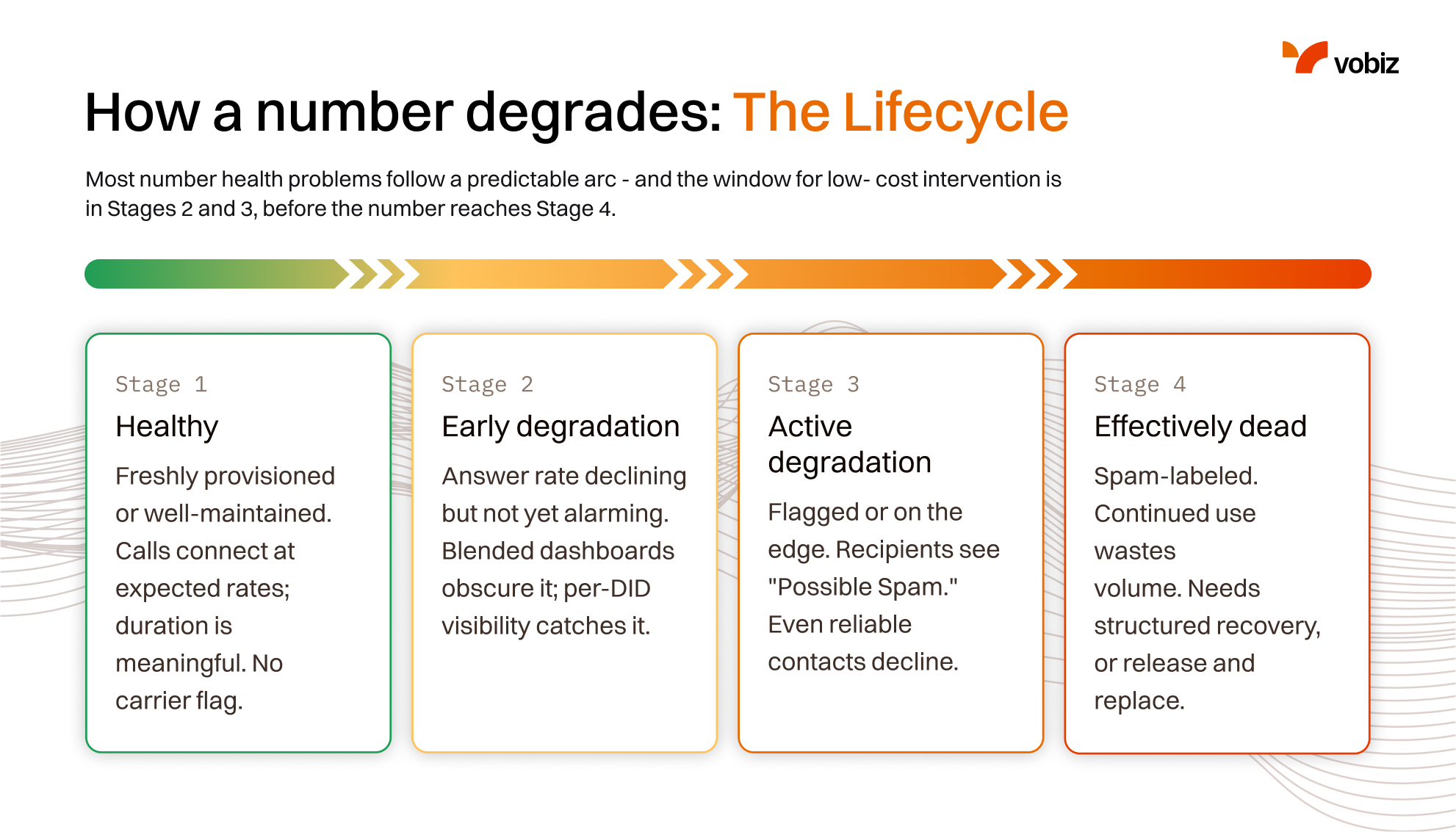
Understanding the degradation lifecycle helps teams intervene earlier. Most number health problems follow a predictable arc — and the window for low-cost intervention is in Stages 2 and 3, before the number reaches Stage 4.
Stage 1
Healthy
Freshly provisioned or well-maintained. Calls connect at expected rates; duration is meaningful. No carrier flag.
Stage 2
Early degradation
Answer rate declining but not yet alarming. Blended dashboards obscure it; per-DID visibility catches it.
Stage 3
Active degradation
Flagged or on the edge. Recipients see "Possible Spam." Even reliable contacts decline.
Stage 4
Effectively dead
Spam-labeled. Continued use wastes volume. Needs structured recovery, or release and replace.
The degradation arc — intervene in Stages 2–3, before Stage 4.
Stage 1: Healthy
The number is freshly provisioned or well-maintained. Calls connect at expected rates. Average call duration is meaningful on outbound campaigns. Carrier analytics engines have no flag on the number.
Stage 2: Early degradation
Answer rate is declining but not yet alarming. This is the stage that blended campaign dashboards most often obscure — the aggregate metric looks acceptable, but one specific DID is already trending down. Per-DID visibility catches what campaign-level aggregates miss.
Common contributing factors at this stage
- Daily call volume consistently near or above the recommended limit for that market
- A growing share of answered calls ending in short durations — a behavioral signal that carrier analytics engines associate with spam patterns
- Cold calling without opt-in context, which drives hang-up behavior and rejection patterns that degrade number reputation
Stage 3: Active degradation
The number is flagged or on the edge of flagging. Carrier analytics engines — and in India, TrueCaller — have started classifying the number as suspicious. Recipients are seeing "Possible Spam" or similar labels. Even contacts who would normally answer are declining.
Visible signals
- Answer rate in steep decline week over week
- High failure rates (
CALL_REJECTED,NO_ANSWERdominant in CDRs) - Short-duration calls even when answered — recipients hanging up immediately
Stage 4: Effectively dead
The number has been spam-labeled. Continuing to use it for outbound campaigns wastes call volume. The number needs structured spam recovery or should be released and replaced.
The five signals of an unhealthy number
Number Health data surfaces five core signals. Here is what each one tells you and what to do when it moves in the wrong direction.
Answer rate
Answered calls as a % of total placed on this DID.
Failed call count
Calls that didn't connect — NO_ANSWER, CALL_REJECTED, USER_BUSY.
Avg call duration
Mean session length on answered calls — a trust signal.
Daily volume trend
30-day chart of total, answered, and failed calls by day.
Total call volume (cumulative)
Total calls through this DID over the 30-day window — the proactive-rotation signal.
Signal 1 — Answer rate
What it is
Calls answered as a percentage of total calls placed on this DID.
What to watch for
A sustained decline week over week on a specific number — especially when that decline is isolated to one DID while others in the same campaign hold steady.
What to check when it drops
- If the decline is isolated to one DID, the issue is most likely that number — look at volume, duration, and failure patterns on that DID specifically
- If answer rate drops across all DIDs simultaneously, the issue is more likely the campaign — contact list quality, calling hours, or agent behavior (a prompt change, model update, or TTS voice change).
Signal 2 — Failed call count
What it is
Calls that did not connect — including NO_ANSWER, CALL_REJECTED, USER_BUSY, and ORIGINATOR_CANCEL.
Why it matters
Rising failed calls, especially CALL_REJECTED (explicit rejection by the recipient), is a strong spam signal. When a number is marked spam, recipients don't just stop answering — they actively decline. A CALL_REJECTED rate climbing as a proportion of total failed calls warrants immediate attention.
CALL_REJECTEDNO_ANSWERREJECTED
Signal 3 — Average call duration
What it is
Mean session length for answered calls.
What to look for
A drop in average duration on answered calls — especially a shift toward very short durations — indicates that people are answering and hanging up immediately. This is a trust signal, not a connectivity issue. The number's caller ID display is creating distrust before the agent can engage.
As the Vobiz Number Utilization Guide notes, short-duration calls and hang-ups are behavioral patterns that carrier analytics engines directly associate with spam classification.
Signal 4 — Daily call volume trend
What it is
The 30-day daily chart showing total, answered, and failed calls by day.
What to look for
- Diverging lines: Total calls flat or rising while answered calls trend down — early flagging signal
- Spike then drop: A heavy single-day campaign followed by sustained answer rate decline — volume threshold likely crossed
- Sudden failed call spike: May indicate carrier-level blocking or routing change on that specific number
Signal 5 — Total call volume (cumulative)
What it is
Total calls made through this DID over the 30-day window.
Why it matters
High cumulative volume on a single number significantly increases spam flagging risk, even if individual daily volumes are within guidelines. This is the signal for proactive rotation — don't wait for the answer rate to drop before moving a high-volume number to cool-down.
Choosing the right number for the right use case
Number health starts at provisioning. The number series you choose directly affects pickup rates and compliance posture before a single call is made.
Number series guide for India
India's telecom regulator (TRAI) mandates specific number series for specific use cases. Using the wrong series is not just a best practice violation — it is a compliance issue that can result in campaign blocking and carrier action, both of which accelerate number degradation.
| Series | Intended use case | Why it matters |
|---|---|---|
| 79 / 80 | General outbound AI agent campaigns and business calls | Resemble standard mobile numbers, which recipients in Karnataka and Gujarat associate with familiar calling patterns. Higher pickup rates for general outbound. |
| 22 | Mumbai-region campaigns | Geographically associated with Mumbai; local familiarity increases answer rates for region-specific outreach. |
| 11 | Delhi-region campaigns | Geographically associated with Delhi; same local familiarity advantage as the 22 series. |
| 92 | Campaigns where answer rate optimization is the primary objective | High-pickup-rate series; recommended when connect rate is the overriding campaign KPI. |
| 1600 | BFSI — banking, financial services, insurance outbound | Mandatory under TRAI for service/transactional calls by BFSI institutions. Signals a legitimate, trustworthy call from a financial institution. Using 1600 for marketing or sales rather than service/transactional creates classification exposure. Non-compliance results in carrier blocking, not just flagging. |
| 1400 | Promotional and marketing campaigns | Mandatory for outbound promotional calling. Requires full DLT (Distributed Ledger Technology) header and template registration before any campaign traffic is sent. |
Extending a 1600 series beyond its mandated service and transactional use into marketing or sales campaigns, or using a standard DID for promotional traffic, creates compliance exposure and potential carrier action that degrades numbers faster than any volume issue.
Global DIDs
For non-India campaigns, Vobiz provides DIDs in 130+ countries with outbound connectivity in 190+ countries. The same health principles apply globally — answer rate monitoring, volume guidelines, and rotation strategy — though spam flagging mechanics and regulatory requirements vary by country and carrier.
Monitoring number health in the Vobiz dashboard
The Vobiz Number Health Analytics dashboard provides a per-DID analytics view for every phone number in your account — giving teams the per-number visibility that campaign-level dashboards in orchestration platforms and standard CDR reporting do not provide.
Who benefits from per-DID visibility
- Outbound sales and contact center teams running multiple DIDs across campaigns can immediately isolate which number is underperforming rather than investigating across the entire campaign
- In-house and self-hosted voice AI operators with no orchestration-layer analytics get their first native per-DID view without building custom instrumentation
- Voice AI operators on platforms with agent-scoped analytics (
assistantId, not by phone number) gain the DID-level signal the orchestration layer does not surface - High-volume operations running number pools across markets can track cumulative DID load across 30 days and act on proactive rotation before answer rates decline
Dashboard overview
Navigate to Phone Numbers in the Vobiz console. Select any number to open its Number Health panel. You will see:
- Number Details — status, monthly fee, purchase date, billing dates
- Number Health (Last 30 Days) — the core analytics view: Total Calls / Answered / Failed (count), Answer Rate (%), Avg Duration (m s), Total Minutes
- Daily Call Volume Chart — 30-day line chart with total, answered, and failed call lines by day
+91 80 6548 1638
Answer rate trending downTotal calls
720
Answered
270
Failed
450
Answer rate
37.5%
Reading the dashboard: a practical walkthrough
The figures below are illustrative examples to demonstrate how to interpret the dashboard — not benchmarks.
Total 850 · Answered 530 · Failed 320 · Answer rate 62.3% · Avg duration 2m 15s
Performing well. Answer rate is strong, average duration is meaningful. No intervention needed. Continue monitoring volume trends if this is a high-frequency number.
Total 720 · Answered 270 · Failed 450 · Answer rate 37.5% · Avg duration 1m 05s
Answer rate has dropped significantly and failed calls now exceed answered calls. Investigate this week. Check whether the decline is isolated to this DID (number issue) or shared across other DIDs in the same campaign (list, timing, or agent issue). If isolated, begin cooling this number.
Total 30 · Answered 19 · Failed 11 · Answer rate 63.3% · Avg duration 1m 05s
With only 30 total calls, this number is low-volume and currently healthy. Watch for answer rate trends following any concentrated usage period.
What to check weekly
- Answer rate per number, not just campaign average
- Failed call count trend — is it growing faster than total call volume?
- Average duration — any sudden drops indicate caller ID trust issues
- Cumulative volume — high-volume numbers need proactive rotation before answer rate degrades
Daily volume best practices: the numbers that matter
Call volume is the primary controllable lever for number health. The right limits vary by market.
India: cold and warm campaign limits
The Vobiz Number Utilization Guide establishes the following thresholds for India-based campaigns.
Cold outbound
500–600
calls / number / day (max)
Warm leads
1k–10k
calls / number / day (conditional)
Calling window
9–9
9:00 AM – 9:00 PM, even spread
Cold outbound: maximum 500–600 calls per number per day
Above this threshold, carrier analytics engines start classifying calling patterns as suspicious regardless of intent. This applies even when every call is legitimate and consented.
- Distribution: Spread calls evenly across the 9:00 AM to 9:00 PM window. Concentrated bursts — a large number of calls compressed into a short window — trigger pattern recognition flags even when the daily total is within limits.
- Ramp-up: Never spike a newly provisioned number from zero to maximum volume on day one. Gradual ramp-up over several days signals organic, legitimate usage to carrier systems.
Warm leads: 1,000–10,000 calls per number per day — but only when:
- Leads have existing relationships or verified prior interaction with your brand
- Average call duration remains meaningful on answered calls
- Opt-in consent is documented and traceable
- Traffic is distributed evenly across the calling window
Connectivity is significantly higher when calls are warm leads with existing relationships — and call duration and natural conversation patterns signal legitimate usage to carrier systems.
US market: volume and rotation context
For teams running US outbound campaigns, cap usage at roughly 150–200 calls per number per day, with pool rotation on a 24-hour dormancy cycle between pools — using Pool A one day and Pool B the next to allow carrier velocity checks to reset.
A healthy connect rate is 12–25%; a sudden drop to single digits (~8% or below) indicates a compromised or flagged number pool.
Monitor volume, answer rate, and duration together in Number Health. Volume alone does not tell the full story.
Number rotation strategy
Rotation is the most common defense against number degradation — and the most commonly applied reactively. Proactive rotation keeps numbers alive.
The four-step rotation framework
Step 1
Use each number once per day
Run one session per DID per day rather than continuous traffic across an extended window. Repetitive caller ID patterns across long sessions accelerate flagging.
Step 2
Rotate across DIDs on alternate days
A campaign distributing volume across multiple numbers is healthier than concentrating it through one — both in per-DID volume and calling pattern diversity.
Step 3
Watch cumulative 30-day volume
When a number shows high cumulative call volume, move it to cool-down proactively — even when the current answer rate is still healthy.
Step 4
Retire and replace, don't over-recover
Some significantly degraded numbers aren't worth recovery for high-volume outbound. Release them via the dashboard or Phone Numbers API, bring in fresh DIDs, and apply the lessons to the replacements.
Building a healthy number pool
Always maintain more than one active number per campaign. For high-volume outbound, segment pools strictly by use case — never using inbound support lines or warm-lead callback numbers for cold outreach. If a cold pool gets burned, your existing customer-facing numbers must remain clean.
Spam recovery: what to do when a number is flagged
The following steps are drawn directly from the Vobiz Number Utilization Guide, Section 5: Spam Recovery Best Practices.
When Number Health shows a declining answer rate and the issue has been isolated to a specific DID — not a list, timing, or agent issue — the following structured recovery process applies.
Pause outbound traffic immediately
Take the number off all outbound campaigns. Continuing to drive high-volume outbound on a flagged number extends the recovery timeline.
Run legitimate low-volume traffic
Use the number for 5–10 inbound or operator-initiated calls with meaningful call durations of 3–5 minutes. Calls with genuine two-way conversation signal legitimate usage to carrier analytics engines. This is the most important recovery step and the most commonly skipped.
Update caller identity
Refresh the caller identity information associated with the number in caller ID registries. In India, this means updating the business display name on TrueCaller Business — TrueCaller operates independently of carrier-level spam flags and its classification directly affects answer rates given its user base in India. For US-based numbers, the equivalent step is a CNAM (Caller Name) update. CNAM is the carrier-level database that controls what business name displays on the recipient's caller ID. Verifying and refreshing your CNAM registration with your telephony provider ensures the correct business name is displaying — a degraded or blank CNAM display compounds answer rate problems independently of spam classification. If the number is displaying incorrectly or has been labeled, refreshing this identity is a required recovery step — whether via TrueCaller Business in India or CNAM with your provider in the US.
Gradual reintroduction
After the cooling period of approximately one week, reintroduce the number at low volume and monitor Number Health closely. Watch for answer rate stabilization before scaling back up.
Monitor and decide
If the number recovers to a healthy answer rate after reintroduction, it is viable. If it plateaus at a degraded level, release it and bring a fresh number into the pool.
Programmatic number health: automating monitoring and response
The Vobiz dashboard's Number Health section provides real-time insights into the performance of every DID. This data is exposed through a dedicated API, allowing you to build custom dashboards, automate monitoring, proactively rotate numbers, and detect performance degradation before it impacts your campaigns.
Authentication: include X-Auth-ID and X-Auth-Token headers with every request.
Base URL: https://api.vobiz.ai
1 — Get Number Health for a DID
EndpointThis endpoint powers the Number Health panel. It returns the overall health status of the number, summary metrics, and the data used to render the usage graph.
curl -X GET \
  "https://api.vobiz.ai/api/v1/account/{accountID}/numbers/+91xxxxxxxxxx/health?granularity=daily&days=30" \
  --header 'X-Auth-ID: {auth_id}' \
  --header 'X-Auth-Token: {auth_token}'
Query parameters
| Parameter | Default | Description |
|---|---|---|
granularity | daily | daily or hourly |
days | 30 | Number of days to look back |
since | — | Set to purchase to fetch data since the number was purchased |
date | Today (UTC) | Required for hourly granularity (YYYY-MM-DD) |
Each metric in the Number Health panel maps directly to a field in the API response:
| Dashboard metric | API field |
|---|---|
| Health Status | usage_status |
| Total Calls | summary.total_calls |
| Answered Calls | summary.answered_calls |
| Failed Calls | summary.total_calls − summary.answered_calls |
| Answer Rate | summary.answer_rate |
| Avg Duration | summary.avg_duration |
| Total Minutes | summary.total_minutes |
| Daily Usage Graph | snapshots[] |
The health rating is recalculated nightly based on the previous 7 days of activity:
| Condition | Usage status |
|---|---|
| Fewer than 10 calls | unrated |
| Answer rate ≥ 60% | healthy |
| Answer rate ≥ 30% | degraded |
| Answer rate < 30% | poor |
2 — List all numbers
EndpointThis endpoint returns all active DIDs associated with an account. Each number includes usage_status and is_spam fields, allowing you to quickly identify numbers that may require attention before fetching detailed health analytics.
3 — Understanding failures
EndpointThe Number Health endpoint provides aggregated statistics. If you need a deeper breakdown of why calls are failing, use the CDR endpoint to analyze individual call records and group them by hangup cause.
curl -X GET \
  "https://api.vobiz.ai/api/v1/Account/{auth_id}/Call/?from_number=+91xxxxxxxxxx&call_direction=outbound" \
  --header 'X-Auth-ID: {auth_id}' \
  --header 'X-Auth-Token: {auth_token}'
4 — Managing number rotation
Endpointcurl -X POST \
"https://api.vobiz.ai/api/v1/account/{accountID}/numbers/purchase" \
--header 'X-Auth-ID: {auth_id}' \
--header 'X-Auth-Token: {auth_token}' \
-H 'Content-Type: application/json' \
-d '{ "country": "IN", "area_code": "80", "quantity": 1 }'curl -X DELETE \
"https://api.vobiz.ai/api/v1/account/{accountID}/numbers/+91xxxxxxxxxx" \
--header 'X-Auth-ID: {auth_id}' \
--header 'X-Auth-Token: {auth_token}'5 — Automated number monitoring workflow
A typical system follows this flow:
Fetch all active numbers using the Numbers API
Retrieve Number Health data for each DID
Monitor usage_status, answer rate, failed calls, and call volume
Alert your team when a number becomes degraded or poor
Rotate traffic away from underperforming numbers
Purchase replacement DIDs and retire old ones when necessary
Endpoint summary
| Purpose | Endpoint |
|---|---|
| Number Health Analytics | GET /api/v1/account/{accountID}/numbers/{e164}/health |
| List Numbers | GET /api/v1/account/{accountID}/numbers |
| Purchase Numbers | POST /api/v1/account/{accountID}/numbers/purchase |
| Release Number | DELETE /api/v1/account/{accountID}/numbers/{e164} |
| Call Detail Records | GET /api/v1/Account/{auth_id}/Call/ |
Regulatory compliance: major markets
Regulatory compliance is both a legal obligation and a direct input to number health. Non-compliant calling patterns do not just create legal exposure — they trigger carrier filtering, accelerate spam labeling, and degrade number reputation faster than volume issues alone.
Regulatory compliance reference table
| Requirement | United States | India |
|---|---|---|
| Regulatory body | FCC (Federal Communications Commission) | TRAI (Telecom Regulatory Authority of India) |
| Primary legislation | TCPA (Telephone Consumer Protection Act); FCC regulations | TRAI Telecom Commercial Communications Customer Preference Regulations (TCCCPR) |
| Permitted calling hours | 8:00 AM – 9:00 PM (recipient's local time) per TCPA | 9:00 AM – 9:00 PM per TRAI guidelines |
| Do-not-call framework | FTC's National Do Not Call Registry; state-level DNC lists | TRAI's National Customer Preference Register (NCPR) |
| Consent requirements | Written or verbal prior express consent required for most commercial calls (TCPA); opt-in required for autodialed or prerecorded calls | Documented opt-in consent under TRAI's UCC (Unsolicited Commercial Communication) framework |
| Number authentication standard | STIR/SHAKEN — mandatory for Tier-1 carriers; A-level attestation is full authentication | DLT (Distributed Ledger Technology) — mandatory for 1400/1600 series; sender registration and template pre-approval required |
| Mandatory number series | No series mandate; 10DLC registration required for A2P SMS; toll-free verification for high-volume calling | 1600 series for BFSI; 1400 series for promotional/marketing; standard DIDs for general outbound |
| Spam / reputation framework | Carrier analytics engines (Hiya, TNS Call Guardian, First Orion) operating independently of STIR/SHAKEN; CNAM display affects answer rates independently of spam classification; no single registry | TrueCaller (independent of carrier-level flags); CNAP (Calling Name Presentation, TRAI-mandated); carrier-side analytics |
| Key compliance risk | TCPA litigation; FCC enforcement actions; carrier filtering | TRAI enforcement; campaign blocks; DID suspension |
Source: FCC, TRAI
A note on STIR/SHAKEN
STIR/SHAKEN authenticates the identity of the caller — it does not protect against spam labels from analytics engines. A fully A-attested call can still be labeled "Spam Likely" if historical call behavior or complaint rates are negative. Authentication and reputation management are separate disciplines.
DLT registration for India (1400 / 1600 series)
Using 1400 or 1600 series numbers requires completed DLT registration before any campaign traffic is sent. See the Vobiz DLT Registration Guide and 140/160 Number Acquisition Guide for step-by-step setup.
TrueCaller, CNAP, and number health in India
TrueCaller's database operates independently of carrier-level spam flags — a number can be labeled as spam by TrueCaller while still operationally clean at the carrier level, and vice versa. For India outbound campaigns, two TrueCaller practices directly affect number health:
- Register business numbers on TrueCaller Business to ensure correct business name display and prevent false spam labeling
- Include a TrueCaller identity refresh in your spam recovery process — when a number has been flagged, updating the business name in TrueCaller's database is a required recovery step, distinct from anything at the carrier level
In India, TRAI has also mandated CNAP (Calling Name Presentation) — a carrier-level standard that displays the registered business name on incoming calls. Unlike TrueCaller, which operates as an independent database, CNAP works at the network layer. For outbound campaigns, ensuring your business name is correctly registered for CNAP display is a separate step from TrueCaller Business registration, and both matter for how your number appears to recipients.
The number health checklist
Use this checklist at campaign launch, weekly, and monthly to maintain a healthy number estate.
About VobizAI-native telephony infrastructure, built for voice AI teams.
Vobiz is an AI-native telephony infrastructure platform built for voice AI teams. We provide SIP trunking, programmable voice APIs, WebSocket audio streaming, and direct carrier connectivity in 130+ countries — with native integrations for Vapi, Retell AI, ElevenLabs, LiveKit, Pipecat, Bolna, Ultravox, and the OpenAI Realtime API.
The Number Health dashboard, with per number call analytics, is live for all accounts today.