> ## Documentation Index
> Fetch the complete documentation index at: https://www.vobiz.ai/docs/llms.txt
> Use this file to discover all available pages before exploring further.
# Sub-Accounts - Child Accounts, Credentials & Number Assignment
> Create and run sub-accounts in the Vobiz Console - child accounts with their own Auth ID and Auth Token, inherited or independent KYC, token rotation with a grace window, and phone numbers assigned from the parent inventory.
**Subaccounts** are child accounts under your parent account. Each one gets its own **Auth ID** and **Auth Token**, its own numbers, and its own usage - which is what makes them the unit of isolation for resellers, platforms billing their own customers, and teams that want staging traffic kept away from production.
Open them from **Setup → Subaccounts** in the left sidebar.
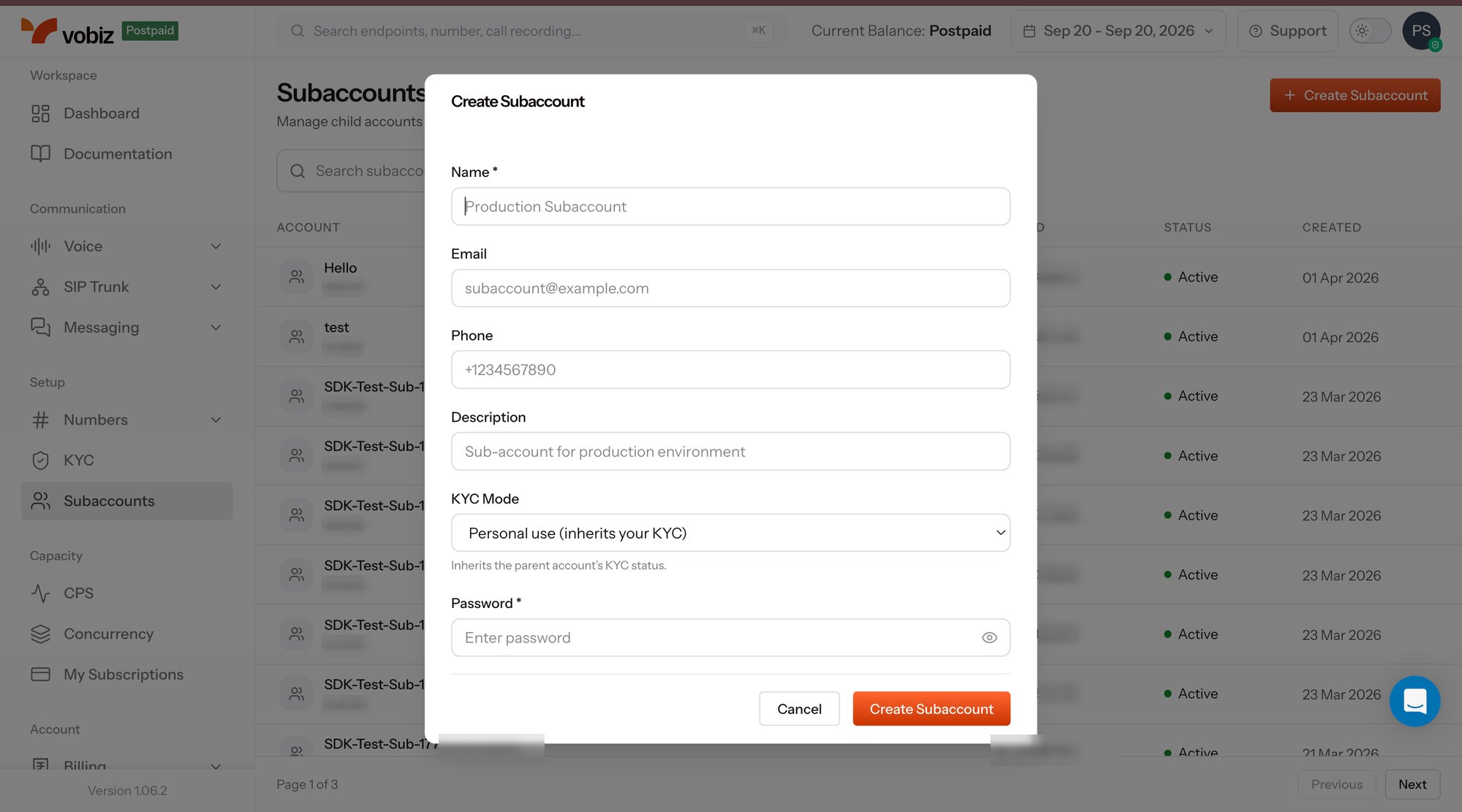 The list shows every child account with its **Account ID**, **Auth ID**, **Status**, and **Created** date, with a search box above and paging below.
## Create a sub-account
Click **+ Create Subaccount** in the top right and fill the dialog:
| Field | Required | What it does |
| --------------- | -------- | ------------------------------------------------------------------------------------------------------------------------------------------------------------------------------------------------------------------------------------------------------------------------------------- |
| **Name** | Yes | Label for the sub-account - typically your customer's or team's name. It is what you will scan the list for later. |
| **Email** | – | Login address for the sub-account's own console user, and where its account mail goes. |
| **Phone** | – | Contact number on the account record. |
| **Description** | – | Free text - handy for recording the environment or the internal owner. |
| **KYC Mode** | Yes | Decides whose KYC the sub-account runs under. **Personal use** inherits the parent account's KYC status, so the sub-account is usable immediately. Choose an independent mode when the child is a separate legal entity that must complete [its own KYC](/docs/sub-accounts/kyc/overview). |
| **Password** | Yes | Console password for the sub-account's user. |
Click **Create Subaccount**, and the child account appears in the list with credentials already issued.
KYC mode is the field to get right up front. A sub-account that inherits the parent's KYC is trading under your verified identity; one that verifies independently carries its own. For regulated Indian numbering series this determines which entity the numbers are attributed to - see the [KYC overview](/docs/sub-accounts/kyc/overview).
## The sub-account detail panel
Selecting a row opens the detail panel - the account record, its credentials, and its numbers in one place.
The list shows every child account with its **Account ID**, **Auth ID**, **Status**, and **Created** date, with a search box above and paging below.
## Create a sub-account
Click **+ Create Subaccount** in the top right and fill the dialog:
| Field | Required | What it does |
| --------------- | -------- | ------------------------------------------------------------------------------------------------------------------------------------------------------------------------------------------------------------------------------------------------------------------------------------- |
| **Name** | Yes | Label for the sub-account - typically your customer's or team's name. It is what you will scan the list for later. |
| **Email** | – | Login address for the sub-account's own console user, and where its account mail goes. |
| **Phone** | – | Contact number on the account record. |
| **Description** | – | Free text - handy for recording the environment or the internal owner. |
| **KYC Mode** | Yes | Decides whose KYC the sub-account runs under. **Personal use** inherits the parent account's KYC status, so the sub-account is usable immediately. Choose an independent mode when the child is a separate legal entity that must complete [its own KYC](/docs/sub-accounts/kyc/overview). |
| **Password** | Yes | Console password for the sub-account's user. |
Click **Create Subaccount**, and the child account appears in the list with credentials already issued.
KYC mode is the field to get right up front. A sub-account that inherits the parent's KYC is trading under your verified identity; one that verifies independently carries its own. For regulated Indian numbering series this determines which entity the numbers are attributed to - see the [KYC overview](/docs/sub-accounts/kyc/overview).
## The sub-account detail panel
Selecting a row opens the detail panel - the account record, its credentials, and its numbers in one place.
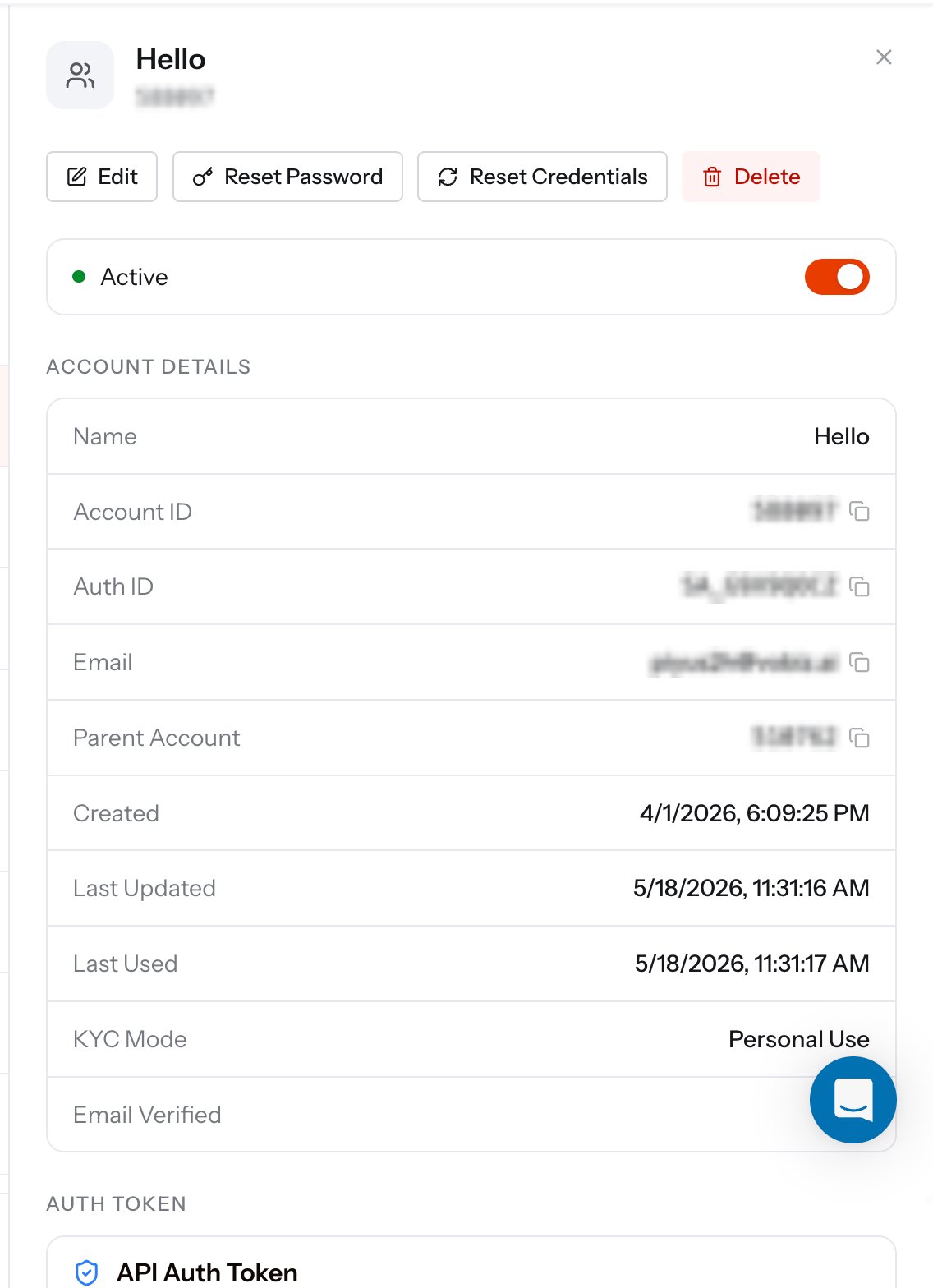 ### Account details
| Field | What it is |
| ------------------------------ | -------------------------------------------------------------------------------------------------------------------------------------------------- |
| **Name** | The label you gave the sub-account. |
| **Account ID** | Numeric identifier for the child account. |
| **Auth ID** | The sub-account's API identity, prefixed `SA_`. This is the `X-Auth-ID` header its code sends - the parent's `MA_` Auth ID is a different account. |
| **Email** | Login address on the sub-account. |
| **Parent Account** | The account this one hangs off - your own. |
| **Created** / **Last Updated** | Record lifecycle timestamps. |
| **Last Used** | When the sub-account last authenticated. A useful staleness check before you delete one. |
| **KYC Mode** | The mode chosen at creation. |
| **Email Verified** | Whether the login address has been confirmed. |
### Actions
| Button | What it does |
| --------------------- | -------------------------------------------------------------------------------------------------------------------------------------------------------- |
| **Edit** | Change the name, description, and contact details. |
| **Reset Password** | Issue a new console password for the sub-account's user. |
| **Reset Credentials** | Re-issue the API credentials. |
| **Delete** | Remove the sub-account. |
| **Active toggle** | Suspend or resume the sub-account without deleting it. A suspended sub-account stops placing traffic while its record, numbers, and history stay intact. |
## Auth Token and rotation
Every sub-account carries an **API Auth Token** to pair with its `SA_` Auth ID. Together they are exactly the credentials the [Vobiz API](/docs/api-reference/authentication) expects, so a sub-account's code authenticates the same way the parent's does - different header values, identical flow.
### Account details
| Field | What it is |
| ------------------------------ | -------------------------------------------------------------------------------------------------------------------------------------------------- |
| **Name** | The label you gave the sub-account. |
| **Account ID** | Numeric identifier for the child account. |
| **Auth ID** | The sub-account's API identity, prefixed `SA_`. This is the `X-Auth-ID` header its code sends - the parent's `MA_` Auth ID is a different account. |
| **Email** | Login address on the sub-account. |
| **Parent Account** | The account this one hangs off - your own. |
| **Created** / **Last Updated** | Record lifecycle timestamps. |
| **Last Used** | When the sub-account last authenticated. A useful staleness check before you delete one. |
| **KYC Mode** | The mode chosen at creation. |
| **Email Verified** | Whether the login address has been confirmed. |
### Actions
| Button | What it does |
| --------------------- | -------------------------------------------------------------------------------------------------------------------------------------------------------- |
| **Edit** | Change the name, description, and contact details. |
| **Reset Password** | Issue a new console password for the sub-account's user. |
| **Reset Credentials** | Re-issue the API credentials. |
| **Delete** | Remove the sub-account. |
| **Active toggle** | Suspend or resume the sub-account without deleting it. A suspended sub-account stops placing traffic while its record, numbers, and history stay intact. |
## Auth Token and rotation
Every sub-account carries an **API Auth Token** to pair with its `SA_` Auth ID. Together they are exactly the credentials the [Vobiz API](/docs/api-reference/authentication) expects, so a sub-account's code authenticates the same way the parent's does - different header values, identical flow.
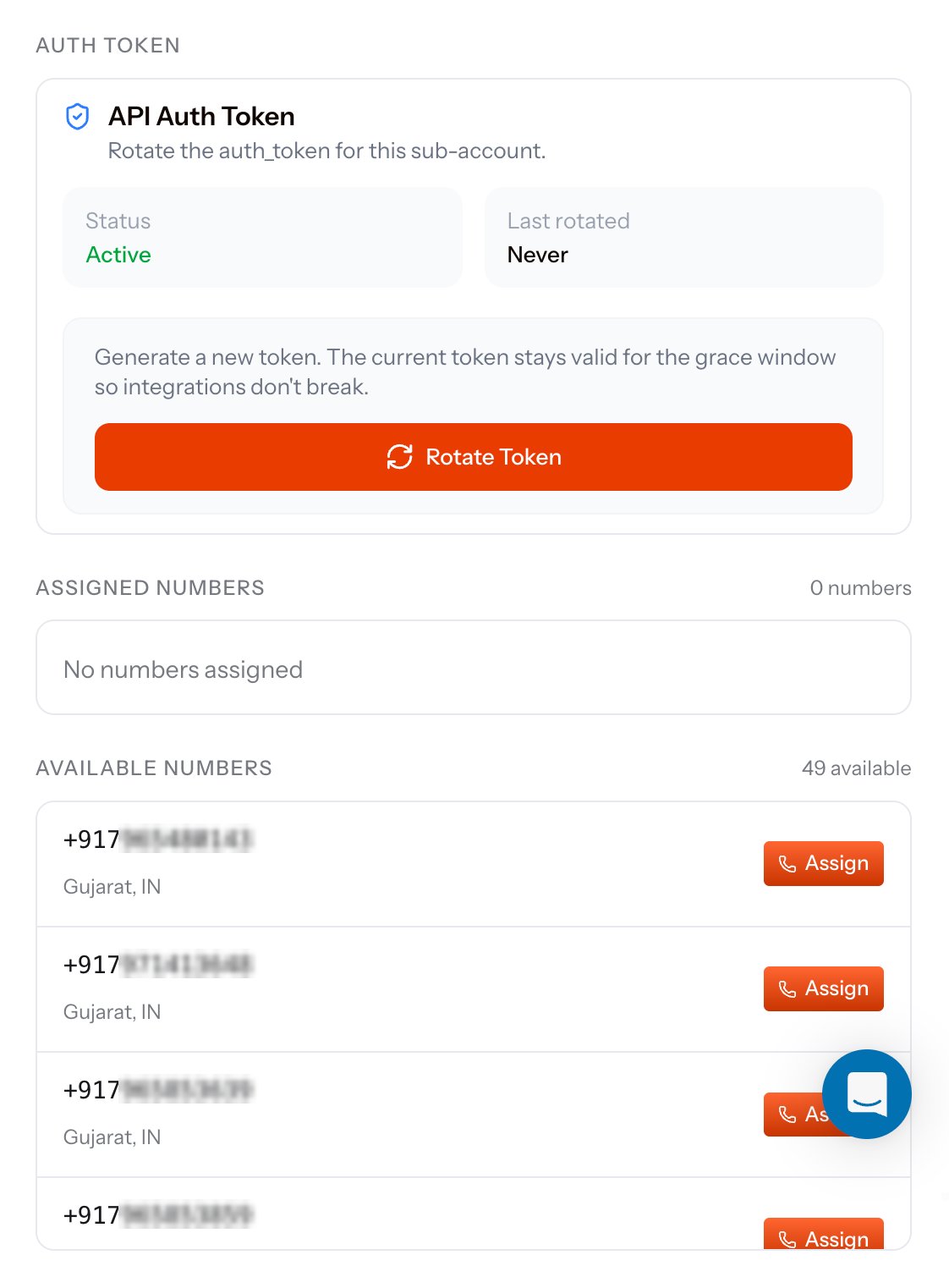 The **API Auth Token** card shows the token's **Status** and when it was **Last rotated**. **Rotate Token** generates a new one, and the previous token stays valid for a grace window so live integrations keep authenticating while you roll the new value out.
Rotate on a schedule, and rotate immediately if a token has been pasted into a ticket, a log, or a shared document. The grace window means you can rotate first and redeploy second.
## Assigning phone numbers
The panel ends with two lists:
| Section | What it holds |
| --------------------- | ----------------------------------------------------------------------------------------------------------------------------------------- |
| **Assigned Numbers** | Numbers currently owned by this sub-account, with the count. Inbound calls to these numbers, and their CDRs, belong to the child account. |
| **Available Numbers** | Numbers sitting on the parent account that are free to hand down. Click **Assign** on a row to move it. |
Assignment is reversible - pull a number back to the parent at any time. The same moves over the API are [Assign to sub-account](/docs/account-phone-number/assign-subaccount) and [Unassign from sub-account](/docs/account-phone-number/unassign-subaccount), and the parent-side view of the estate is [My Numbers](/docs/platform/numbers/my-numbers).
## The same operations over the API
Provision a child account and receive its `auth_id` and `auth_token`.
Page through every child account under the parent.
The end-to-end path for onboarding a customer as a sub-account.
PAN, GST, CIN, and DigiLocker verification for child accounts.
The **API Auth Token** card shows the token's **Status** and when it was **Last rotated**. **Rotate Token** generates a new one, and the previous token stays valid for a grace window so live integrations keep authenticating while you roll the new value out.
Rotate on a schedule, and rotate immediately if a token has been pasted into a ticket, a log, or a shared document. The grace window means you can rotate first and redeploy second.
## Assigning phone numbers
The panel ends with two lists:
| Section | What it holds |
| --------------------- | ----------------------------------------------------------------------------------------------------------------------------------------- |
| **Assigned Numbers** | Numbers currently owned by this sub-account, with the count. Inbound calls to these numbers, and their CDRs, belong to the child account. |
| **Available Numbers** | Numbers sitting on the parent account that are free to hand down. Click **Assign** on a row to move it. |
Assignment is reversible - pull a number back to the parent at any time. The same moves over the API are [Assign to sub-account](/docs/account-phone-number/assign-subaccount) and [Unassign from sub-account](/docs/account-phone-number/unassign-subaccount), and the parent-side view of the estate is [My Numbers](/docs/platform/numbers/my-numbers).
## The same operations over the API
Provision a child account and receive its `auth_id` and `auth_token`.
Page through every child account under the parent.
The end-to-end path for onboarding a customer as a sub-account.
PAN, GST, CIN, and DigiLocker verification for child accounts.