> ## Documentation Index
> Fetch the complete documentation index at: https://www.vobiz.ai/docs/llms.txt
> Use this file to discover all available pages before exploring further.
# My Numbers - Your Number Inventory
> Manage the phone numbers on your Vobiz account - filter by status, type and link state, see which voice app or trunk each number routes to, check monthly rent and reputation, export the list, and release numbers you no longer need.
**My Number** is the inventory of every phone number your account owns - what it costs, what it routes to, and whether it is healthy. It is the screen you come back to after buying, and the one to check first when an inbound call does not land.
```text URL theme={null}
https://console.vobiz.ai/app/numbers
```
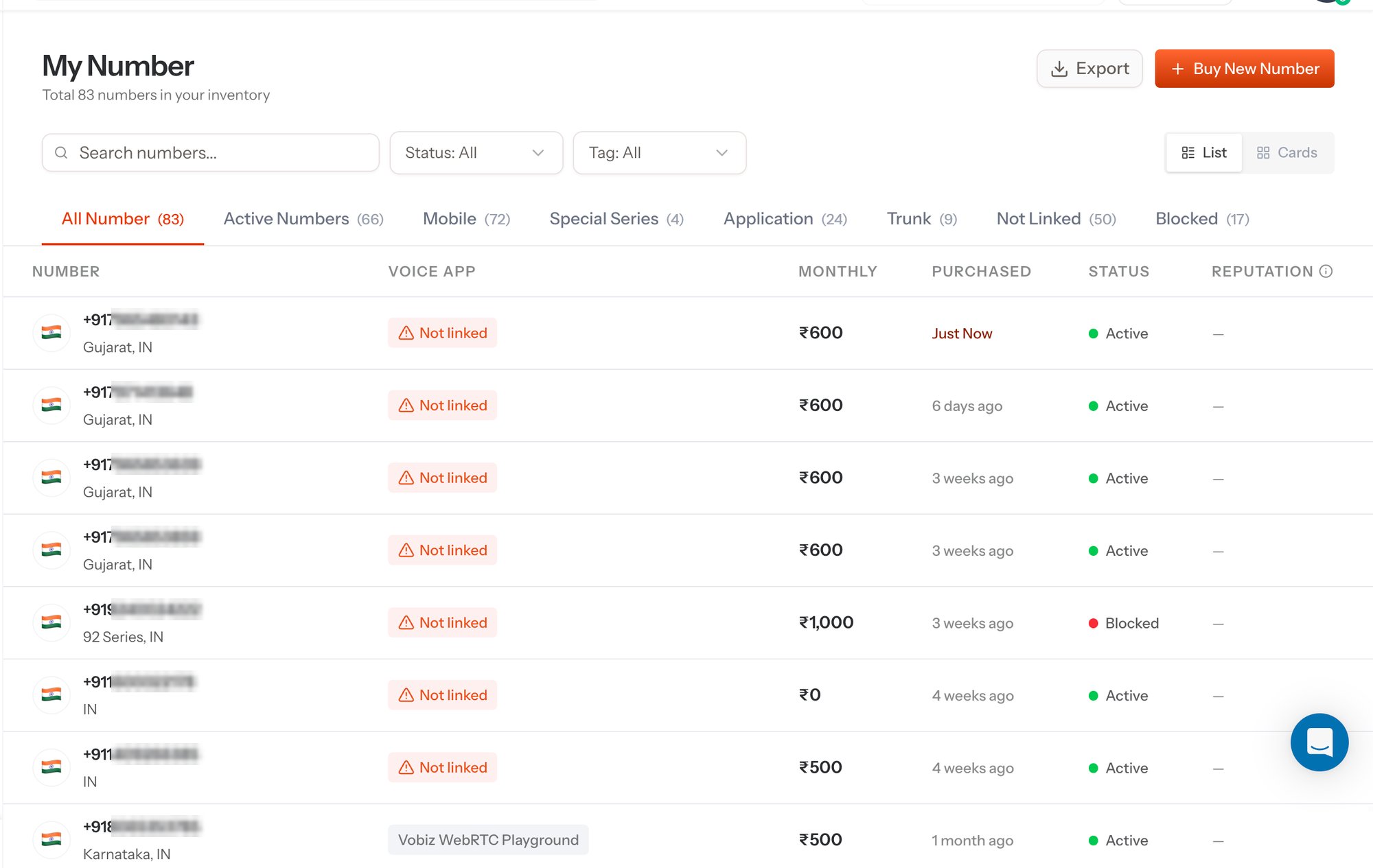 The subtitle under the title is your running total - **Total N numbers in your inventory**.
## Tabs
The tabs slice the same inventory different ways, and each carries its own count so you can see the shape of your estate at a glance.
| Tab | What it shows |
| ------------------ | -------------------------------------------------------------------------------------------------------- |
| **All Number** | Every number on the account, whatever its state. |
| **Active Numbers** | Numbers currently live and able to carry traffic. |
| **Mobile** | Numbers in a mobile range. |
| **Special Series** | Numbers in a special numbering series - in India, the [140, 160 and 92 series](/docs/buy-a-phone-number). |
| **Application** | Numbers linked to an [XML application](/docs/platform/voice/applications). |
| **Trunk** | Numbers linked to an [inbound SIP trunk](/docs/platform/sip/inbound-trunks). |
| **Not Linked** | Numbers with no application and no trunk behind them. These accept no inbound calls until you link them. |
| **Blocked** | Numbers currently blocked. |
**Not Linked** is the first tab to open when an inbound call fails to reach your webhook - a number that was bought and never routed is the most common cause.
## Search, filter, and view
| Control | What it does |
| -------------------- | ------------------------------------------------------------------------------------------------- |
| **Search numbers…** | Free-text match on the number itself. |
| **Status** | Filters by lifecycle state - for example Active or Blocked. |
| **Tag** | Filters by the tags you have applied to numbers, so you can group by team, customer, or campaign. |
| **List / Cards** | Switches between the dense table and a card layout. |
| **Export** | Downloads the current inventory for spreadsheets, billing reconciliation, or an audit. |
| **+ Buy New Number** | Opens [Numbers Inventory](/docs/platform/numbers/buy). |
## Columns
| Column | What it tells you |
| -------------- | --------------------------------------------------------------------------------------------------------------------------------------------------------------------------------------------------------------------- |
| **Number** | The number in E.164 plus its region and country. |
| **Voice App** | The [application](/docs/platform/voice/applications) handling inbound calls, or a **Not linked** warning pill when nothing is attached. |
| **Monthly** | The recurring rent for that number. |
| **Purchased** | How long ago it was bought - a freshly bought number reads **Just Now**. |
| **Status** | **Active** (green) for a number carrying traffic, **Blocked** (red) for one that is not. |
| **Reputation** | Carrier-side reputation for the number, where the carrier reports it, and `—` where there is nothing to report yet. Query the same signal over the API with [Number health](/docs/account-phone-number/get-number-health). |
## Routing a number
A number is only as useful as the thing behind it. Two destinations are available:
Vobiz fetches your Answer URL on each inbound call and plays back the [XML](/docs/xml/overview/how-it-works) you return. Best for IVRs, AI agents, and anything webhook-driven.
Vobiz delivers the call to your [Origination URI](/docs/platform/sip/origination-uri). Best for a PBX, softswitch, or existing VoIP stack.
Numbers can be re-pointed at any time - the change applies to the next inbound call, so there is no need to schedule a cutover window.
## Handing numbers to a sub-account
Numbers bought on the parent account can be handed down to a [sub-account](/docs/platform/subaccounts), which is how resellers and multi-tenant platforms keep each customer's traffic, CDRs, and billing separate. Assign from the sub-account's detail panel in the console, or over the API:
Move a number from the parent account to a sub-account.
Pull a number back to the parent account.
## Releasing a number
Releasing hands the number back to inventory and stops the monthly rent. The one-time release fee quoted at purchase is charged at this point - it is the figure shown as **₹… release (if released)** in [Numbers Inventory](/docs/platform/numbers/buy).
A released number goes back into general inventory. Plan the cutover before you release a number that is still printed on collateral or configured in a customer's dialler.
Over the API, use [Release a number](/docs/account-phone-number/unrent-number). A release can be reversed inside the cool-off window with [Cancel release](/docs/account-phone-number/cancel-release).
## The same inventory over the API
Page through every number on the account with its application, trunk, and status.
The full resource - buy, list, assign, release, and health.
The subtitle under the title is your running total - **Total N numbers in your inventory**.
## Tabs
The tabs slice the same inventory different ways, and each carries its own count so you can see the shape of your estate at a glance.
| Tab | What it shows |
| ------------------ | -------------------------------------------------------------------------------------------------------- |
| **All Number** | Every number on the account, whatever its state. |
| **Active Numbers** | Numbers currently live and able to carry traffic. |
| **Mobile** | Numbers in a mobile range. |
| **Special Series** | Numbers in a special numbering series - in India, the [140, 160 and 92 series](/docs/buy-a-phone-number). |
| **Application** | Numbers linked to an [XML application](/docs/platform/voice/applications). |
| **Trunk** | Numbers linked to an [inbound SIP trunk](/docs/platform/sip/inbound-trunks). |
| **Not Linked** | Numbers with no application and no trunk behind them. These accept no inbound calls until you link them. |
| **Blocked** | Numbers currently blocked. |
**Not Linked** is the first tab to open when an inbound call fails to reach your webhook - a number that was bought and never routed is the most common cause.
## Search, filter, and view
| Control | What it does |
| -------------------- | ------------------------------------------------------------------------------------------------- |
| **Search numbers…** | Free-text match on the number itself. |
| **Status** | Filters by lifecycle state - for example Active or Blocked. |
| **Tag** | Filters by the tags you have applied to numbers, so you can group by team, customer, or campaign. |
| **List / Cards** | Switches between the dense table and a card layout. |
| **Export** | Downloads the current inventory for spreadsheets, billing reconciliation, or an audit. |
| **+ Buy New Number** | Opens [Numbers Inventory](/docs/platform/numbers/buy). |
## Columns
| Column | What it tells you |
| -------------- | --------------------------------------------------------------------------------------------------------------------------------------------------------------------------------------------------------------------- |
| **Number** | The number in E.164 plus its region and country. |
| **Voice App** | The [application](/docs/platform/voice/applications) handling inbound calls, or a **Not linked** warning pill when nothing is attached. |
| **Monthly** | The recurring rent for that number. |
| **Purchased** | How long ago it was bought - a freshly bought number reads **Just Now**. |
| **Status** | **Active** (green) for a number carrying traffic, **Blocked** (red) for one that is not. |
| **Reputation** | Carrier-side reputation for the number, where the carrier reports it, and `—` where there is nothing to report yet. Query the same signal over the API with [Number health](/docs/account-phone-number/get-number-health). |
## Routing a number
A number is only as useful as the thing behind it. Two destinations are available:
Vobiz fetches your Answer URL on each inbound call and plays back the [XML](/docs/xml/overview/how-it-works) you return. Best for IVRs, AI agents, and anything webhook-driven.
Vobiz delivers the call to your [Origination URI](/docs/platform/sip/origination-uri). Best for a PBX, softswitch, or existing VoIP stack.
Numbers can be re-pointed at any time - the change applies to the next inbound call, so there is no need to schedule a cutover window.
## Handing numbers to a sub-account
Numbers bought on the parent account can be handed down to a [sub-account](/docs/platform/subaccounts), which is how resellers and multi-tenant platforms keep each customer's traffic, CDRs, and billing separate. Assign from the sub-account's detail panel in the console, or over the API:
Move a number from the parent account to a sub-account.
Pull a number back to the parent account.
## Releasing a number
Releasing hands the number back to inventory and stops the monthly rent. The one-time release fee quoted at purchase is charged at this point - it is the figure shown as **₹… release (if released)** in [Numbers Inventory](/docs/platform/numbers/buy).
A released number goes back into general inventory. Plan the cutover before you release a number that is still printed on collateral or configured in a customer's dialler.
Over the API, use [Release a number](/docs/account-phone-number/unrent-number). A release can be reversed inside the cool-off window with [Cancel release](/docs/account-phone-number/cancel-release).
## The same inventory over the API
Page through every number on the account with its application, trunk, and status.
The full resource - buy, list, assign, release, and health.