> ## Documentation Index
> Fetch the complete documentation index at: https://www.vobiz.ai/docs/llms.txt
> Use this file to discover all available pages before exploring further.
# CPS - Buy Call-Initiation Throughput
> Buy calls-per-second capacity in the Vobiz Console - what CPS controls, when to raise it, how the blocks-of-three pricing works, and how to preview the monthly cost before you purchase.
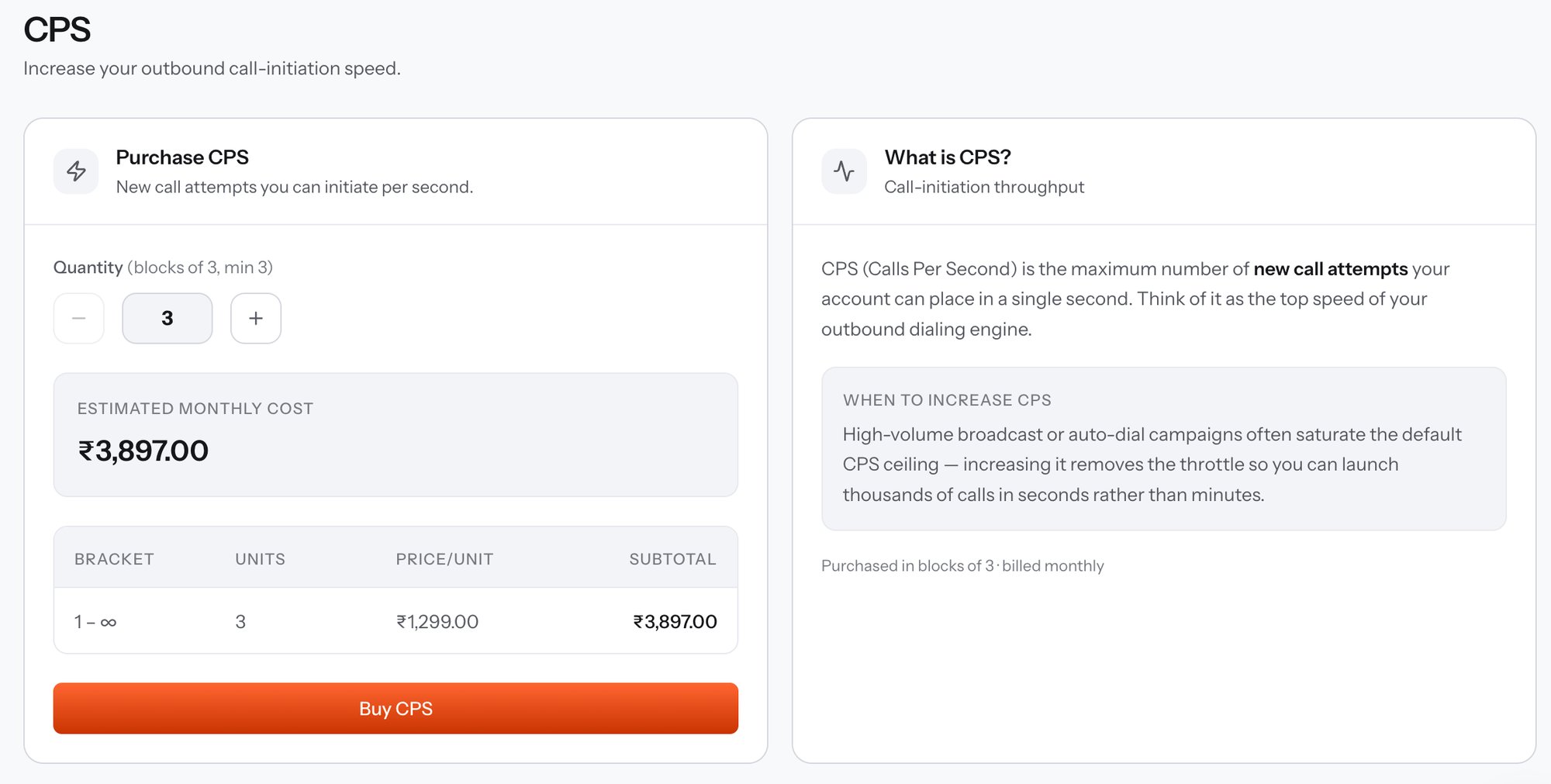
**CPS (Calls Per Second)** is the maximum number of new call attempts your account can start in a single second - the top speed of your outbound dialling engine. It caps how fast calls go out, not how many can be live at once; that second limit is [Concurrency](/docs/platform/capacity/concurrency).
```text URL theme={null}
https://console.vobiz.ai/app/profile/channel-subscriptions/cps
```
Open it from **Capacity → CPS** in the left sidebar.
 ## When to raise CPS
High-volume broadcast and auto-dial campaigns saturate the default CPS ceiling first. Raising it removes the throttle so a run launches thousands of calls in seconds rather than minutes.
The symptom of a CPS ceiling is a [campaign](/docs/platform/campaigns/list) that completes correctly but slowly - attempts trickle out at a steady rate no matter how much concurrency is free. If instead callers hit busy signals, concurrency is the limit, not CPS.
## Buying capacity
| Control | What it does |
| -------------------------- | ----------------------------------------------------------------------------------------------------------------- |
| **Quantity** | Stepper in **blocks of 3**, minimum 3. The − and + buttons move a full block at a time. |
| **Estimated monthly cost** | Recalculates as you step the quantity, before you commit to anything. |
| **Bracket table** | The pricing tier applied to your selection - the bracket, the units bought, the price per unit, and the subtotal. |
| **Buy CPS** | Purchases the capacity and starts a monthly subscription. |
Capacity is **purchased in blocks of 3 and billed monthly**. The first month is charged on purchase, and the subscription then renews on its own cycle until you cancel it from [My Subscriptions](/docs/platform/capacity/subscriptions).
The prices in the screenshot belong to one account's pricing tier. Your own rate appears in the bracket table as you change the quantity, and [Preview capacity pricing](/docs/account/channel-pricing-preview) returns the same figure over the API without charging anything.
## Buy it over the API
Calculate the monthly price for a CPS quantity without creating a subscription.
Create the subscription with `resource_type: "cps"` and a quantity.
## When to raise CPS
High-volume broadcast and auto-dial campaigns saturate the default CPS ceiling first. Raising it removes the throttle so a run launches thousands of calls in seconds rather than minutes.
The symptom of a CPS ceiling is a [campaign](/docs/platform/campaigns/list) that completes correctly but slowly - attempts trickle out at a steady rate no matter how much concurrency is free. If instead callers hit busy signals, concurrency is the limit, not CPS.
## Buying capacity
| Control | What it does |
| -------------------------- | ----------------------------------------------------------------------------------------------------------------- |
| **Quantity** | Stepper in **blocks of 3**, minimum 3. The − and + buttons move a full block at a time. |
| **Estimated monthly cost** | Recalculates as you step the quantity, before you commit to anything. |
| **Bracket table** | The pricing tier applied to your selection - the bracket, the units bought, the price per unit, and the subtotal. |
| **Buy CPS** | Purchases the capacity and starts a monthly subscription. |
Capacity is **purchased in blocks of 3 and billed monthly**. The first month is charged on purchase, and the subscription then renews on its own cycle until you cancel it from [My Subscriptions](/docs/platform/capacity/subscriptions).
The prices in the screenshot belong to one account's pricing tier. Your own rate appears in the bracket table as you change the quantity, and [Preview capacity pricing](/docs/account/channel-pricing-preview) returns the same figure over the API without charging anything.
## Buy it over the API
Calculate the monthly price for a CPS quantity without creating a subscription.
Create the subscription with `resource_type: "cps"` and a quantity.