> ## Documentation Index
> Fetch the complete documentation index at: https://vobiz.ai/docs/llms.txt
> Use this file to discover all available pages before exploring further.
# Campaigns - Launch & Manage Outbound Runs
> Create outbound campaigns in the Vobiz Console - set CPS and concurrency, pick caller IDs with Round Robin / Least Used / Random rotation, upload a Contacts CSV, set the daily calling window and retry budget, and launch.
**Vobiz Campaigns** is the bulk outbound dialler - upload a CSV of phone numbers, pick a reusable webhook [Agent](/docs/platform/campaigns/agents), set concurrency, and Vobiz dials every contact with retries, caller-ID selection, and per-attempt logging.
```text URL theme={null}
https://console.vobiz.ai/app/campaigns
```
## The model
A campaign is built from three resources that live side‑by‑side in the **Voice Applications** sidebar:
Reusable answer/hangup webhook configs. Created once, used by many campaigns.
The actual outbound runs - agent + numbers + contacts + pacing.
Per‑attempt history for every campaign.
```text theme={null}
┌───────────────┐ ┌───────────────┐ ┌───────────────┐
│ Agent │──▶│ Campaign │──▶│ Call Logs │
│ Answer URL │ │ CPS + numbers │ │ Per attempt │
│ Hangup URL │ │ + CSV │ │ outcome │
└───────────────┘ └───────────────┘ └───────────────┘
reusable one outbound run the audit trail
```
Reuse a single Agent across many daily campaigns instead of re‑typing the same URLs every time you launch a run.
## Create a new campaign
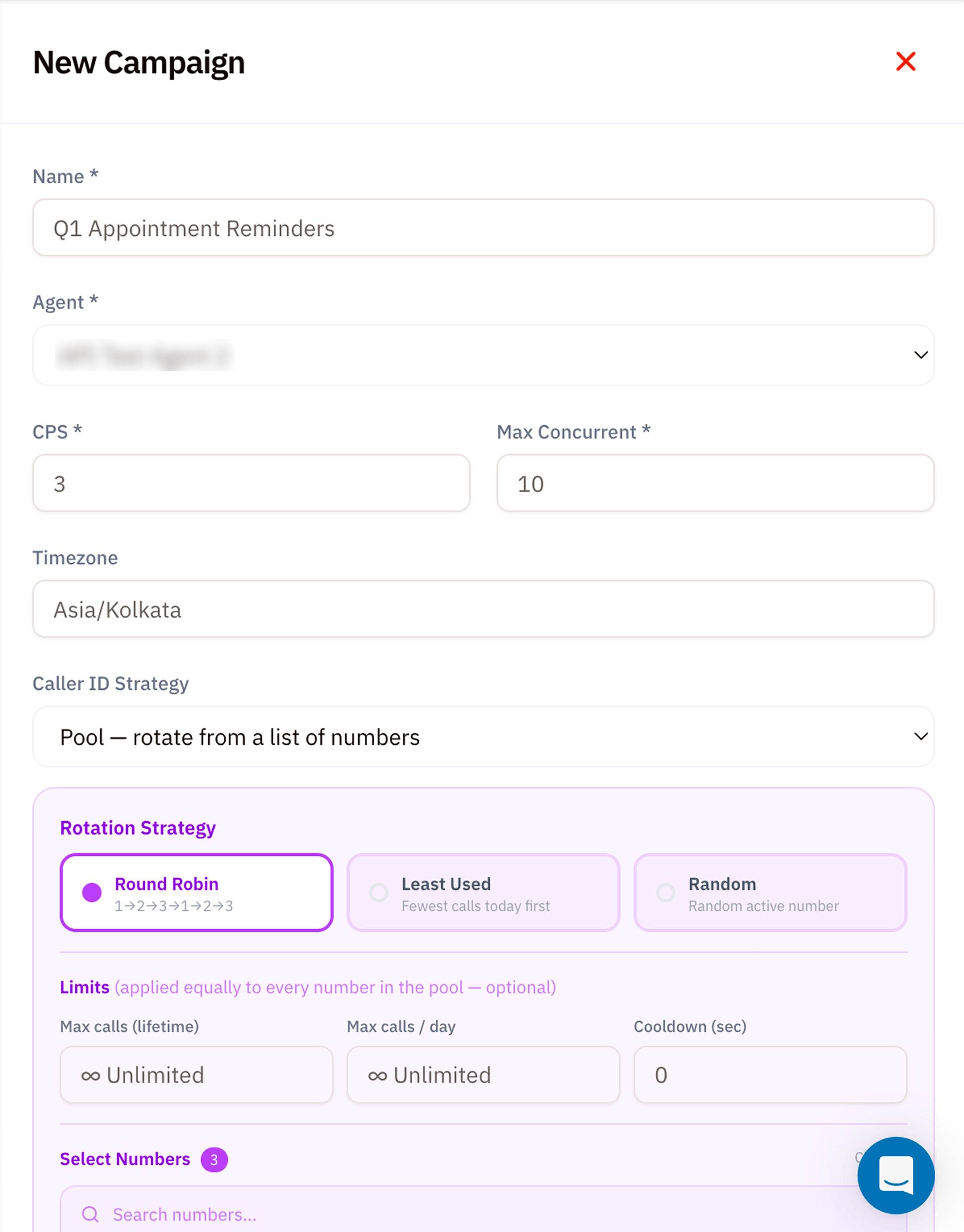
Click **+ New Campaign** to open the side panel. The form is long; this page walks every field in order.
 ### 1. Basic info
| Field | Required | Notes |
| --------- | -------- | ------------------------------------------------------------------------------------------------------------------------------------------------- |
| **Name** | ✅ | A label like *"Q1 Appointment Reminders"* - shown everywhere this campaign appears. |
| **Agent** | ✅ | Dropdown of every [Campaign Agent](/docs/platform/campaigns/agents) on your account. The Agent decides Answer URL, Hangup URL, and static SIP headers. |
### 2. Pacing
| Field | Required | Notes |
| -------------------------- | -------- | ------------------------------------------------------------------------------------------------------------------------------------------------- |
| **CPS** (Calls Per Second) | ✅ | Retained for backward compatibility. Values below `1` normalize to `1`; campaign capacity is enforced through concurrency rather than this value. |
| **Max Concurrent** | ✅ | Cap on simultaneously active campaign calls. Use the [CPS Calculator](/docs/resources/calculator) to size this against your expected call duration. |
| **Timezone** | – | Used by **Daily calling window**. Defaults to your account timezone (e.g. `Asia/Kolkata`). |
Check live account capacity before launch. A campaign can remain `running` but idle while every account concurrency slot is occupied.
### 3. Caller ID Strategy
Decide which of *your* phone numbers should appear as the caller ID on each attempt.
| Strategy | When to use |
| ---------------------------------------- | --------------------------------------------------------------------------------- |
| **Pool - rotate from a list of numbers** | Rotate across eligible numbers with Round Robin, Least Used, or Random selection. |
| **Fixed - use one number** | Every call uses the same caller ID. |
| **Per contact** | Each CSV row provides its caller ID in the required `from` column. |
### 4. Rotation Strategy *(only shown for **Pool**)*
| Strategy | How Vobiz picks the next number |
| --------------- | ---------------------------------------------------------------------------------------------- |
| **Round Robin** | Strict sequence `1 → 2 → 3 → 1 → 2 → 3 …`. Predictable, evenly distributes load. |
| **Least Used** | Picks the number with the fewest calls today first. Self‑balancing under uneven contact lists. |
| **Random** | Picks any active number at random. Best when carriers fingerprint Round Robin patterns. |
### 5. Limits *(optional, applied to **every** number in the pool)*
| Field | Notes |
| ------------------------ | ------------------------------------------------------------------------------------------------- |
| **Max calls (lifetime)** | Stop using a number once it's placed this many calls total. `Unlimited` by default. |
| **Max calls / day** | Daily ceiling per number. Resets at midnight in the campaign's timezone. |
| **Cooldown (sec)** | Minimum gap between two calls from the same number - useful when carriers throttle rapid repeats. |
### 6. Select numbers + Contacts CSV
Scroll down for the second half of the form.
### 1. Basic info
| Field | Required | Notes |
| --------- | -------- | ------------------------------------------------------------------------------------------------------------------------------------------------- |
| **Name** | ✅ | A label like *"Q1 Appointment Reminders"* - shown everywhere this campaign appears. |
| **Agent** | ✅ | Dropdown of every [Campaign Agent](/docs/platform/campaigns/agents) on your account. The Agent decides Answer URL, Hangup URL, and static SIP headers. |
### 2. Pacing
| Field | Required | Notes |
| -------------------------- | -------- | ------------------------------------------------------------------------------------------------------------------------------------------------- |
| **CPS** (Calls Per Second) | ✅ | Retained for backward compatibility. Values below `1` normalize to `1`; campaign capacity is enforced through concurrency rather than this value. |
| **Max Concurrent** | ✅ | Cap on simultaneously active campaign calls. Use the [CPS Calculator](/docs/resources/calculator) to size this against your expected call duration. |
| **Timezone** | – | Used by **Daily calling window**. Defaults to your account timezone (e.g. `Asia/Kolkata`). |
Check live account capacity before launch. A campaign can remain `running` but idle while every account concurrency slot is occupied.
### 3. Caller ID Strategy
Decide which of *your* phone numbers should appear as the caller ID on each attempt.
| Strategy | When to use |
| ---------------------------------------- | --------------------------------------------------------------------------------- |
| **Pool - rotate from a list of numbers** | Rotate across eligible numbers with Round Robin, Least Used, or Random selection. |
| **Fixed - use one number** | Every call uses the same caller ID. |
| **Per contact** | Each CSV row provides its caller ID in the required `from` column. |
### 4. Rotation Strategy *(only shown for **Pool**)*
| Strategy | How Vobiz picks the next number |
| --------------- | ---------------------------------------------------------------------------------------------- |
| **Round Robin** | Strict sequence `1 → 2 → 3 → 1 → 2 → 3 …`. Predictable, evenly distributes load. |
| **Least Used** | Picks the number with the fewest calls today first. Self‑balancing under uneven contact lists. |
| **Random** | Picks any active number at random. Best when carriers fingerprint Round Robin patterns. |
### 5. Limits *(optional, applied to **every** number in the pool)*
| Field | Notes |
| ------------------------ | ------------------------------------------------------------------------------------------------- |
| **Max calls (lifetime)** | Stop using a number once it's placed this many calls total. `Unlimited` by default. |
| **Max calls / day** | Daily ceiling per number. Resets at midnight in the campaign's timezone. |
| **Cooldown (sec)** | Minimum gap between two calls from the same number - useful when carriers throttle rapid repeats. |
### 6. Select numbers + Contacts CSV
Scroll down for the second half of the form.
 #### Select Numbers
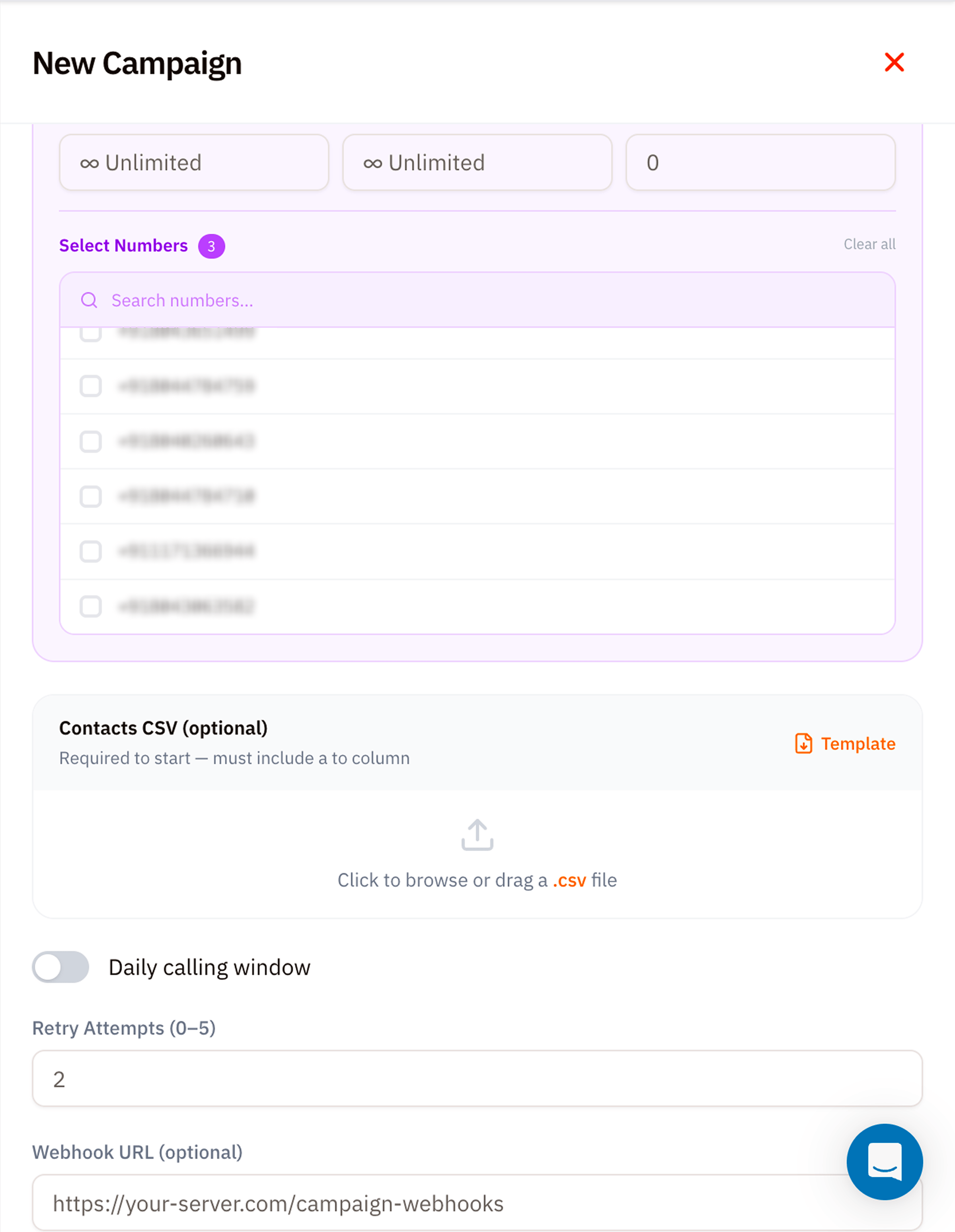
Tick the caller‑ID numbers Vobiz should rotate through. The badge next to **Select Numbers** counts your current selection. Use the search to filter long lists.
#### Contacts CSV (required to start)
Upload a `.csv` file with at minimum a `to` column. Per-contact campaigns also require `from`. Click **Template** to download a starter file with the expected schema:
```csv theme={null}
to,name,custom1,custom2
+918065480214,Asha,reminder=2pm,
+919148227303,Ravi,reminder=4pm,
```
`answer_url` and `hangup_url` can override the Agent for one contact. Other custom columns are sent as custom SIP headers.
Phone numbers must be in **E.164 format** (`+`). Vobiz rejects rows without a leading `+`.
### 7. Daily calling window *(optional)*
Toggle on to restrict outbound dialling to specific hours in the campaign's timezone - e.g. 9am–7pm Mon–Sat for India compliance. Attempts queue outside the window and fire at the next allowed slot.
### 8. Retry Attempts
How many times to retry a contact beyond the initial attempt. Range `0–5`. Retry delays are configured in minutes, and `retry_window_days` limits how long retries remain eligible.
### 9. Webhook URL *(optional)*
A campaign-level webhook Vobiz POSTs to for campaign events such as `campaign.started`, `campaign.paused`, `campaign.resumed`, `campaign.completed`, and contact outcomes such as `contact.answered` or `contact.retry_scheduled`. Requests are signed with `X-VoBiz-Signature`.
```text Example webhook URL theme={null}
https://your-server.com/campaign-webhooks
```
## Launch and monitor
Click **Create Campaign** at the bottom of the form. Vobiz validates the CSV, queues every row, and starts dialling at the next allowed slot.
Watch progress from two places:
* The **Campaigns** list itself - each row shows `attempted / total`, status, and ETA.
* [Campaign Call Logs](/docs/platform/campaigns/call-logs) - per‑attempt detail with hangup cause and (if recorded) audio.
## Pause, resume, abort
Each campaign card has three controls:
* **⏸ Pause** - stop placing new attempts. Calls already in flight finish normally.
* **▶ Resume** - restart from where the pause left off.
* **⏹ Abort** - cancel remaining attempts permanently. Completed attempts stay in the logs.
## Tips
* **Always pilot.** Run a 100‑row CSV first to confirm Agent Answer URLs, caller‑ID rotation, and CRM webhook handling. Then scale.
* **Watch concurrency.** A saturated account leaves a campaign running but idle until capacity becomes available.
* **Choose caller IDs deliberately.** Use a fixed number for consistency, per-contact values for explicit routing, or a pool for rotation and per-number limits.
* **Compliance windows matter.** In India, outbound calling outside 9am–9pm risks DLT complaints - set the daily window or set retry attempts conservatively.
## What's next
Watch every attempt as it runs.
Size CPS, concurrency, and daily volume before launching.
Build the same workflow through the voice API.
#### Select Numbers
Tick the caller‑ID numbers Vobiz should rotate through. The badge next to **Select Numbers** counts your current selection. Use the search to filter long lists.
#### Contacts CSV (required to start)
Upload a `.csv` file with at minimum a `to` column. Per-contact campaigns also require `from`. Click **Template** to download a starter file with the expected schema:
```csv theme={null}
to,name,custom1,custom2
+918065480214,Asha,reminder=2pm,
+919148227303,Ravi,reminder=4pm,
```
`answer_url` and `hangup_url` can override the Agent for one contact. Other custom columns are sent as custom SIP headers.
Phone numbers must be in **E.164 format** (`+`). Vobiz rejects rows without a leading `+`.
### 7. Daily calling window *(optional)*
Toggle on to restrict outbound dialling to specific hours in the campaign's timezone - e.g. 9am–7pm Mon–Sat for India compliance. Attempts queue outside the window and fire at the next allowed slot.
### 8. Retry Attempts
How many times to retry a contact beyond the initial attempt. Range `0–5`. Retry delays are configured in minutes, and `retry_window_days` limits how long retries remain eligible.
### 9. Webhook URL *(optional)*
A campaign-level webhook Vobiz POSTs to for campaign events such as `campaign.started`, `campaign.paused`, `campaign.resumed`, `campaign.completed`, and contact outcomes such as `contact.answered` or `contact.retry_scheduled`. Requests are signed with `X-VoBiz-Signature`.
```text Example webhook URL theme={null}
https://your-server.com/campaign-webhooks
```
## Launch and monitor
Click **Create Campaign** at the bottom of the form. Vobiz validates the CSV, queues every row, and starts dialling at the next allowed slot.
Watch progress from two places:
* The **Campaigns** list itself - each row shows `attempted / total`, status, and ETA.
* [Campaign Call Logs](/docs/platform/campaigns/call-logs) - per‑attempt detail with hangup cause and (if recorded) audio.
## Pause, resume, abort
Each campaign card has three controls:
* **⏸ Pause** - stop placing new attempts. Calls already in flight finish normally.
* **▶ Resume** - restart from where the pause left off.
* **⏹ Abort** - cancel remaining attempts permanently. Completed attempts stay in the logs.
## Tips
* **Always pilot.** Run a 100‑row CSV first to confirm Agent Answer URLs, caller‑ID rotation, and CRM webhook handling. Then scale.
* **Watch concurrency.** A saturated account leaves a campaign running but idle until capacity becomes available.
* **Choose caller IDs deliberately.** Use a fixed number for consistency, per-contact values for explicit routing, or a pool for rotation and per-number limits.
* **Compliance windows matter.** In India, outbound calling outside 9am–9pm risks DLT complaints - set the daily window or set retry attempts conservatively.
## What's next
Watch every attempt as it runs.
Size CPS, concurrency, and daily volume before launching.
Build the same workflow through the voice API.