> ## Documentation Index
> Fetch the complete documentation index at: https://www.vobiz.ai/docs/llms.txt
> Use this file to discover all available pages before exploring further.
# ClickUp integration
> A Vobiz WebRTC softphone that logs calls into ClickUp - agents dial in the browser, and each completed call becomes a ClickUp task carrying the CDR and a signed recording link.
A WebRTC softphone that logs calls into ClickUp. Agents dial from the softphone, talk in the browser, and each completed call becomes a ClickUp task carrying the CDR and a playable recording link.
**Source code:** [vobiz-ai/Vobiz-ClickUp-Calling](https://github.com/vobiz-ai/Vobiz-ClickUp-Calling) — the softphone, the Node backend that answers Vobiz webhooks, and the scripts that provision Vobiz and backfill CDRs.
**Scope:** inbound and outbound, with browser audio over WebRTC. `npm test` runs 63 assertions across the call flows, the ClickUp task shape and a security-regression group. A live call has not been run since the 2.0.0 security rewrite, so verify both directions on your own account before rolling it out.
**This is a page you open beside ClickUp, not a ClickUp extension.** ClickUp is written through its REST API with a personal token — there is no OAuth app, no iframe, and no command-centre entry. If you need a listable App Directory app, that gap is the work.
## What you get
| | |
| --------------------- | ---------------------------------------------------------------------------- |
| **Softphone dialer** | Dial from the page, with a task card that finds the customer's existing task |
| **One task per call** | Written to `CLICKUP_LIST_ID` with the full CDR in the description |
| **Caller lookup** | Inbound numbers matched against existing ClickUp tasks |
| **Recordings** | A playback link that is HMAC-signed and expires |
| **CDR backfill** | `npm run fetch-cdr` pulls recent CDRs and syncs them from the command line |
| **Browser audio** | Calls run over WebRTC in the tab — no desk phone, no desktop app |
## How it works
The one thing to understand first: **the browser is the A leg.** The softphone sends the SIP INVITE itself, and the backend answers `` to reach the customer.
```text theme={null}
softphone ──SIP INVITE──▶ Vobiz ──answer_url──▶ backend /answer
│
──▶ customer
```
**Build it this way round.** Originating to the customer over the REST API first and then bridging the agent in with `` does not work for a registered WebRTC endpoint — the customer answers, hears ringback, and then *"the agent could not be reached"*.
Inbound is the exception: `` is the only way to reach a registered endpoint, and it works today.
| Path | Role |
| ------------------------------------------ | ------------------------------------------------------------------------------------------------------- |
| `clickup-app/` | The softphone — `vobiz-sip.js` is the JsSIP layer, `softphone.js` the dialer, call states and task card |
| `backend/server.js` | Answers Vobiz webhooks, serves the softphone, holds credentials, creates ClickUp tasks |
| `scripts/tunnel.js` | Starts a Cloudflare quick tunnel and records its hostname |
| `scripts/create-vobiz-app-and-endpoint.js` | Provisions the Vobiz application and SIP endpoint |
| `scripts/fetch-cdr.js` | Pulls recent CDRs and syncs them to ClickUp from the command line |
## Requirements
| Requirement | Detail |
| ----------------- | ----------------------------------------------------------------------------------------------------- |
| Vobiz account | `AUTH_ID`, `AUTH_TOKEN`, a number, and balance — [console.vobiz.ai](https://console.vobiz.ai) |
| ClickUp workspace | A personal API token, plus the team ID and the list ID that receives call tasks |
| Public HTTPS URL | `cloudflared` or another tunnel. Vobiz must reach `/answer`, `/dial-status` and `/recording-callback` |
| Runtime | Node 18+ |
## Step 1: Prove the Vobiz account
Place a call with [rtc-demo.vobiz.ai](https://rtc-demo.vobiz.ai/). If that fails, nothing here will work and you will debug the wrong layer for a day.
## Step 2: Provision Vobiz
```bash theme={null}
npm run provision
```
This creates the Vobiz application and the SIP endpoint the softphone registers as. To do it by hand, create the endpoint first:
```bash theme={null}
curl -X POST "https://api.vobiz.ai/api/v1/Account/$AUTH_ID/Endpoint/" \
-H "X-Auth-ID: $AUTH_ID" -H "X-Auth-Token: $AUTH_TOKEN" \
-H "Content-Type: application/json" \
-d '{"username":"cuagent","password":"","alias":"ClickUp Agent"}'
```
**Vobiz rewrites the username you submit.** Send `cuagent` and the stored username comes back as something like `cuagent1187694299145202883643`. Read the stored `username` out of the response — that is what registers, and what `VOBIZ_SIP_USER` must contain.
## Step 3: Run the backend
```bash theme={null}
cp backend/.env.example backend/.env # then fill it in
npm start # backend on :8092
npm run tunnel # public HTTPS, in a second shell
```
`cloudflared` must be on your PATH (`brew install cloudflared`, or `winget install --id Cloudflare.cloudflared -e`). The binary is deliberately not committed.
The `.env` values that matter:
| Variable | Purpose |
| -------------------------------------- | ---------------------------------------------------------------------- |
| `VOBIZ_AUTH_ID`, `VOBIZ_AUTH_TOKEN` | Account credentials from the console |
| `VOBIZ_FROM_NUMBER` | Caller ID — must be a number the account owns |
| `VOBIZ_SIP_USER`, `VOBIZ_SIP_PASSWORD` | The endpoint from step 2. `VOBIZ_REGISTRAR` stays `registrar.vobiz.ai` |
| `CLICKUP_API_TOKEN` | A `pk_…` personal token |
| `CLICKUP_TEAM_ID`, `CLICKUP_LIST_ID` | Where call tasks are created |
| `SIGNING_SECRET` | Signs recording playback links |
| `RECORDING_URL_TTL_SECONDS` | Playback link lifetime, `900` by default |
| `ALLOW_MOCK` | `1` lets the backend simulate CRM writes when no ClickUp token is set |
**`CLICKUP_API_TOKEN` is a personal token carrying its owner's full ClickUp access** — every space that user can see. Treat it as a high-value credential and scope the account accordingly.
Then **verify before opening the softphone**:
```bash theme={null}
BASE=$(cat backend/tunnel-url.txt)
curl -s "$BASE/health"
curl -s "$BASE/answer?From=sip:x@registrar.vobiz.ai&To=91XXXXXXXXXX&RouteType=sip"
```
The second must return `` containing ``. Anything else — a tunnel error page, an ngrok interstitial — and every call dies silently.
## Step 4: Sign in and call
Open `http://localhost:8092/` for the softphone. While it is registering, the badge reads **CONNECTING**.
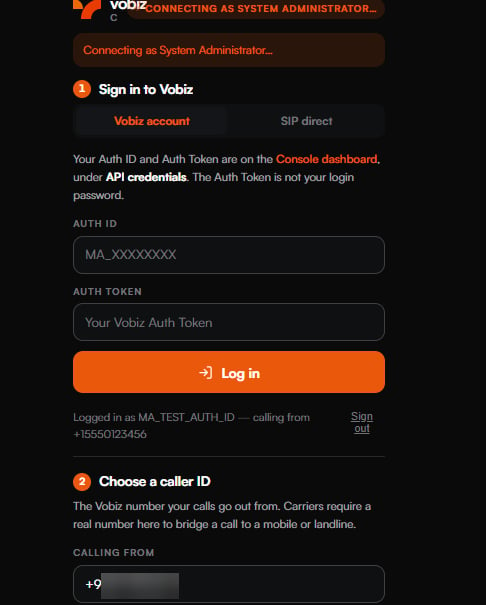 Sign in with the **Auth ID and Auth Token** from the [console](https://console.vobiz.ai) under **API credentials** — or switch to **SIP direct** for an endpoint username, password and caller ID. Allow the microphone. The badge turns green when JsSIP has registered.
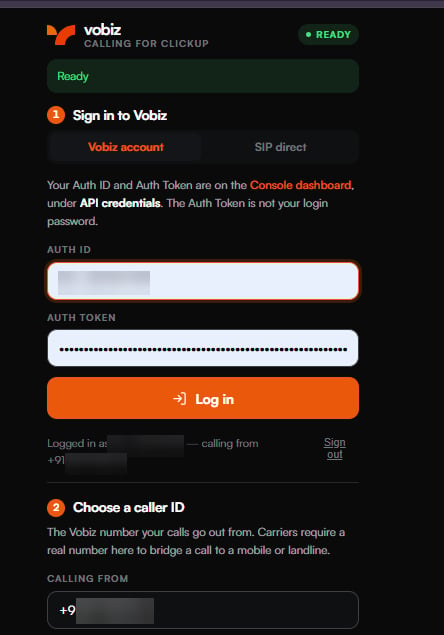 **Wait for the status to read Ready before dialling.** That is the SIP registration landing; dialling before it rings the customer into silence.
### Choose a caller ID
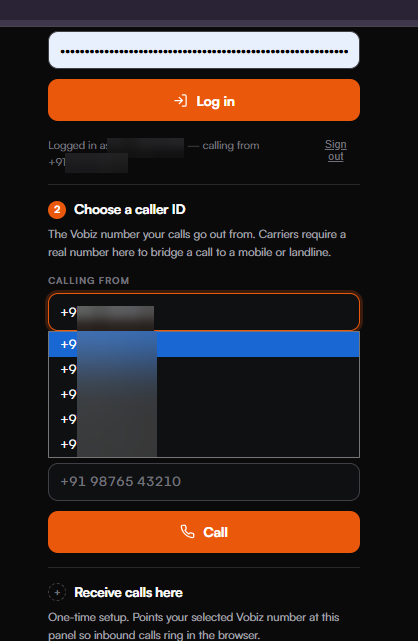
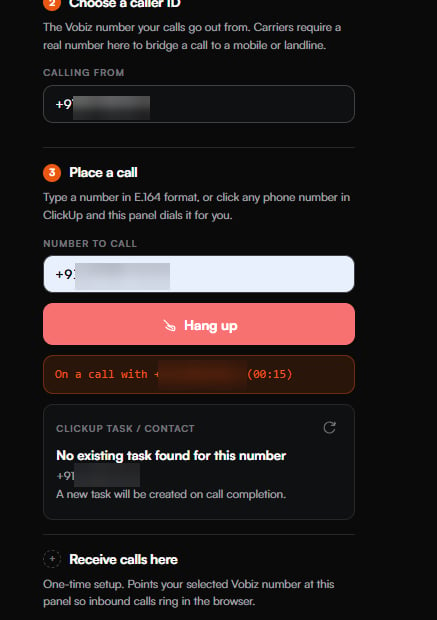
**Calling from** lists the numbers on the account. Carriers require a real number here to bridge a call to a mobile or landline.
**Wait for the status to read Ready before dialling.** That is the SIP registration landing; dialling before it rings the customer into silence.
### Choose a caller ID
**Calling from** lists the numbers on the account. Carriers require a real number here to bridge a call to a mobile or landline.
 ### Place the call
Type a number in E.164 format, or click any phone number in ClickUp and the panel dials it for you.
### Place the call
Type a number in E.164 format, or click any phone number in ClickUp and the panel dials it for you.
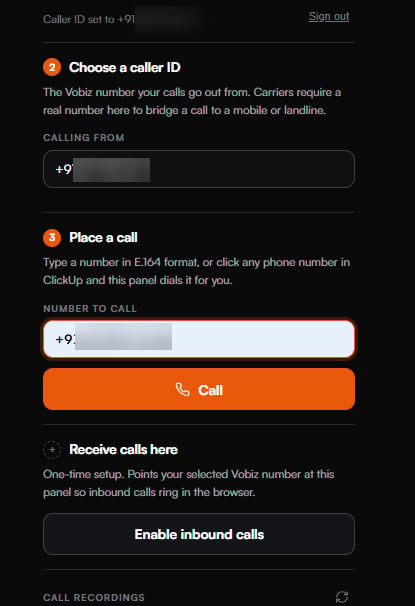 Once connected the panel shows the timer and, underneath, the **ClickUp task / contact** card — the task this call will be filed against, or notice that a new one will be created on hangup.
 ## Inbound calls
**Receive calls here** is the one-time setup that points your selected Vobiz number at this panel. After that, a call to the DID raises an in-panel prompt — **Enter** accepts, **Escape** declines.
## Inbound calls
**Receive calls here** is the one-time setup that points your selected Vobiz number at this panel. After that, a call to the DID raises an in-panel prompt — **Enter** accepts, **Escape** declines.
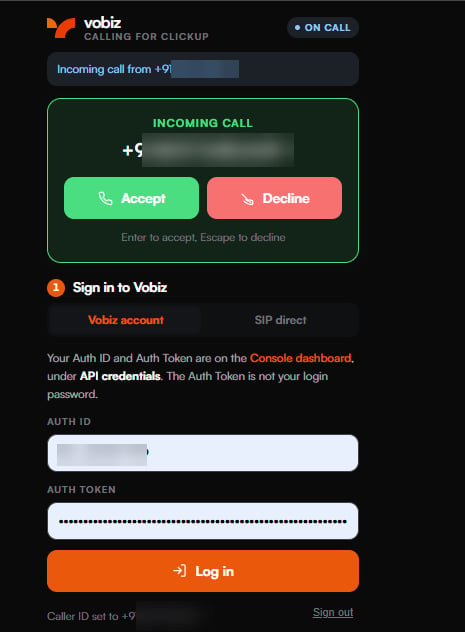 The completed call is logged the same way as an outbound one.
## Recordings
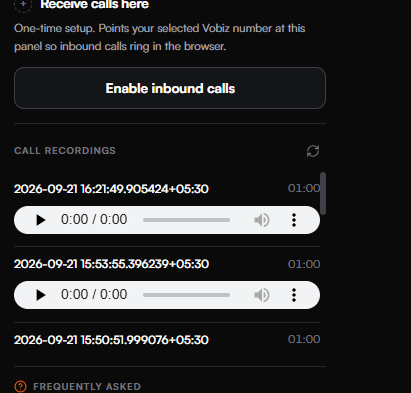
Completed calls appear under **Call recordings**, each with an inline player.
The completed call is logged the same way as an outbound one.
## Recordings
Completed calls appear under **Call recordings**, each with an inline player.
 ## What lands in ClickUp
One task per call, in `CLICKUP_LIST_ID`:
| | |
| --------------- | --------------------------------------------------------------------------------------------------------------------------------------------------- |
| **Title** | `Vobiz Call - ` |
| **Tags** | `vobiz-call`, the direction, and `cdr` |
| **Description** | A Markdown table: call UUID, direction, from, to, agent, duration, hangup cause, status, timestamp — and a playback link when the call was recorded |
**The playback link expires** (`RECORDING_URL_TTL_SECONDS`, 900 seconds by default), so a task read later shows a dead link rather than a permanent one. That is deliberate: these tasks are readable by everyone in the ClickUp space.
Without `CLICKUP_API_TOKEN` the backend logs the task it *would* have created and returns `simulated: true`. It never pretends the write happened.
## Reading the logs
```text theme={null}
[backend] 📞 Browser A-leg: Outbound call to 91… via callerId +91…
[backend] DIAL RESULT status=completed cause=NORMAL_CLEARING bleg=abc-123 dur=42
[backend] 🎧 RECORDING READY: call=… id=…
[ClickUp] ✅ Task created successfully! ID: …
```
**`DialBLegUUID` is the single most useful field in this stack.** Present means the call connected. Empty means no B leg was ever created, whatever the UI said.
## Backend routes
| Route | Role |
| ------------------------------------------------------ | -------------------------------------------------- |
| `POST /answer`, `/fallback`, `/inbound-answer` | The XML Vobiz executes. Branches on direction |
| `GET`/`POST /dial-status` | The `action` target of `` |
| `POST /recording-ready`, `/recording-callback` | Fires when the recording is downloadable |
| `POST /hangup-callback`, `/cdr-callback` | Call teardown |
| `POST /login`, `/login-sip`, `/logout`, `GET /session` | Session handling |
| `GET /api/numbers`, `/api/agent-sip`, `/api/agents` | Caller IDs and SIP identity |
| `POST /api/calls/start`, `/api/calls/end` | Softphone call control |
| `GET /recordings`, `/play-recording` | Recording access |
| `GET /api/clickup/search-task` | Caller lookup |
| `GET`/`POST /sync-recent-cdrs` | Backfill CDRs into ClickUp |
| `GET /health`, `/status` | Whether things are configured, never what they are |
## Troubleshooting
| Problem | What to check |
| --------------------------------------------------------------- | ------------------------------------------------------------------------------------------------------------------------------------------------- |
| **It worked yesterday, now nothing rings** | The quick tunnel hostname changed, so `TUNNEL_URL` and the Vobiz application's `answer_url` are both stale. Nothing warns you; calls simply stop. |
| **The customer answers, then "the agent could not be reached"** | The call was originated the wrong way round — see the architecture warning above. |
| **Tasks are not appearing in ClickUp** | Check `CLICKUP_LIST_ID` and that the token's owner can write to that list. If the log says `simulated: true`, `CLICKUP_API_TOKEN` is not set. |
| **The recording link in an old task is dead** | Expected — links expire after `RECORDING_URL_TTL_SECONDS`. Re-open the recording from the softphone. |
| **`/answer` returns HTML** | You are hitting a tunnel error page, not the backend. Every call will fail until that returns XML. |
## Testing
```bash theme={null}
npm test # starts its own backend, 63 assertions, exits non-zero on failure
npm run test:outbound # drives a simulated outbound call into ClickUp
npm run test:inbound
npm run test:sync # CDR sync
npm run test:recording # playback security
```
The `test:*` scripts drive a backend you started, sign in with the credentials in `backend/.env`, and fail the process when something is wrong.
## Next steps
* [ServiceNow integration →](/docs/integrations/servicenow) - the same softphone architecture inside ITSM.
* [Pipedrive integration →](/docs/integrations/pipedrive) - calls logged as CRM activities.
* [SIP Endpoints →](/docs/platform/voice/endpoints) - create and manage the endpoint the softphone registers as.
* [Call Detail Records →](/docs/cdr) - the CDR API behind `fetch-cdr`.
## What lands in ClickUp
One task per call, in `CLICKUP_LIST_ID`:
| | |
| --------------- | --------------------------------------------------------------------------------------------------------------------------------------------------- |
| **Title** | `Vobiz Call - ` |
| **Tags** | `vobiz-call`, the direction, and `cdr` |
| **Description** | A Markdown table: call UUID, direction, from, to, agent, duration, hangup cause, status, timestamp — and a playback link when the call was recorded |
**The playback link expires** (`RECORDING_URL_TTL_SECONDS`, 900 seconds by default), so a task read later shows a dead link rather than a permanent one. That is deliberate: these tasks are readable by everyone in the ClickUp space.
Without `CLICKUP_API_TOKEN` the backend logs the task it *would* have created and returns `simulated: true`. It never pretends the write happened.
## Reading the logs
```text theme={null}
[backend] 📞 Browser A-leg: Outbound call to 91… via callerId +91…
[backend] DIAL RESULT status=completed cause=NORMAL_CLEARING bleg=abc-123 dur=42
[backend] 🎧 RECORDING READY: call=… id=…
[ClickUp] ✅ Task created successfully! ID: …
```
**`DialBLegUUID` is the single most useful field in this stack.** Present means the call connected. Empty means no B leg was ever created, whatever the UI said.
## Backend routes
| Route | Role |
| ------------------------------------------------------ | -------------------------------------------------- |
| `POST /answer`, `/fallback`, `/inbound-answer` | The XML Vobiz executes. Branches on direction |
| `GET`/`POST /dial-status` | The `action` target of `` |
| `POST /recording-ready`, `/recording-callback` | Fires when the recording is downloadable |
| `POST /hangup-callback`, `/cdr-callback` | Call teardown |
| `POST /login`, `/login-sip`, `/logout`, `GET /session` | Session handling |
| `GET /api/numbers`, `/api/agent-sip`, `/api/agents` | Caller IDs and SIP identity |
| `POST /api/calls/start`, `/api/calls/end` | Softphone call control |
| `GET /recordings`, `/play-recording` | Recording access |
| `GET /api/clickup/search-task` | Caller lookup |
| `GET`/`POST /sync-recent-cdrs` | Backfill CDRs into ClickUp |
| `GET /health`, `/status` | Whether things are configured, never what they are |
## Troubleshooting
| Problem | What to check |
| --------------------------------------------------------------- | ------------------------------------------------------------------------------------------------------------------------------------------------- |
| **It worked yesterday, now nothing rings** | The quick tunnel hostname changed, so `TUNNEL_URL` and the Vobiz application's `answer_url` are both stale. Nothing warns you; calls simply stop. |
| **The customer answers, then "the agent could not be reached"** | The call was originated the wrong way round — see the architecture warning above. |
| **Tasks are not appearing in ClickUp** | Check `CLICKUP_LIST_ID` and that the token's owner can write to that list. If the log says `simulated: true`, `CLICKUP_API_TOKEN` is not set. |
| **The recording link in an old task is dead** | Expected — links expire after `RECORDING_URL_TTL_SECONDS`. Re-open the recording from the softphone. |
| **`/answer` returns HTML** | You are hitting a tunnel error page, not the backend. Every call will fail until that returns XML. |
## Testing
```bash theme={null}
npm test # starts its own backend, 63 assertions, exits non-zero on failure
npm run test:outbound # drives a simulated outbound call into ClickUp
npm run test:inbound
npm run test:sync # CDR sync
npm run test:recording # playback security
```
The `test:*` scripts drive a backend you started, sign in with the credentials in `backend/.env`, and fail the process when something is wrong.
## Next steps
* [ServiceNow integration →](/docs/integrations/servicenow) - the same softphone architecture inside ITSM.
* [Pipedrive integration →](/docs/integrations/pipedrive) - calls logged as CRM activities.
* [SIP Endpoints →](/docs/platform/voice/endpoints) - create and manage the endpoint the softphone registers as.
* [Call Detail Records →](/docs/cdr) - the CDR API behind `fetch-cdr`.